


Launching an Android app involves more than choosing features and approving the design. Businesses must prepare the right technology, budget, security measures, testing plans, and publishing materials. Understanding Android app development requirements early helps owners avoid expensive changes and launch delays. This Android app development checklist provides a practical way to review each decision before development reaches its final stages.
Whether you are building a customer-facing product, an internal business tool, or a new digital service, preparation matters. A clear plan helps your team manage scope, control costs, protect user data, and deliver an app that solves real problems.
Define Your Business Goals and App Objectives
Start by deciding why your business needs an Android app. A clear purpose guides feature decisions, technical planning, and investment. Identify the business problem the app should solve. It might simplify bookings, support online sales, improve customer communication, or streamline internal operations.
Next, define your target audience. Understand their needs, common challenges, device preferences, and expectations. These insights will help your team prioritise useful features.
Set measurable objectives before development begins. For example:
- Increase online enquiries or completed purchases.
- Reduce manual work through process automation.
- Improve customer retention and engagement.
- Give employees faster access to business information.
- Expand services through digital channels.
Choose a few meaningful performance indicators. These might include completed transactions, active users, conversion rates, or task completion time.
Finalise Your Android App Features and Functional Requirements
Once you understand the business objectives, decide what the app must do. Document each feature and explain how users should interact with it.
Common features include:
- User registration, login, and profile management.
- Product or service browsing.
- Search, filters, and personalised recommendations.
- Shopping carts, bookings, or payment options.
- Push notifications and in-app messaging.
- Admin dashboards and reporting.
- Location services and third-party integrations.
Separate essential features from optional improvements. A minimum viable product (MVP) can help you validate the main idea before investing in advanced functionality. For every feature, define its expected behaviour, user permissions, error messages, and dependencies. For example, a booking feature needs availability checks, confirmation messages, and cancellation rules.
Document these details as functional requirements. Also record non-functional expectations, including speed, accessibility, reliability, and expected user capacity. This clarity strengthens the Android app development process. It also gives designers, developers, and testers a shared reference.
Understand the Technical Requirements for Android App Development
Technical planning determines how the app will operate, connect with other systems, and handle future growth. Your technical decisions should support business needs rather than follow trends.
Choose the right development technology
Discuss whether native Android development or a cross-platform approach suits your product. Native development commonly uses Kotlin and Android’s recommended development tools. Your team should also confirm the required Android SDK, supported operating system versions, and development environment. Android documentation guides platform tools, APIs, and compatibility.
Plan the application architecture
Define how the mobile interface communicates with business systems. A typical architecture may include:
- Frontend application for screens and user interactions.
- Backend infrastructure for business logic and processing.
- API integration for connecting external services.
- Database management for storing and retrieving information.
- Cloud hosting, monitoring, and backup services where required.
Select architecture based on expected traffic, data needs, integrations, and operational complexity.
Check device and operating system compatibility
Android devices vary in screen size, hardware, manufacturer customisations, and operating system versions. Plan Android device compatibility around your intended audience and support requirements. Do not assume every device offers identical performance or hardware capabilities. Identify essential features such as cameras, GPS, Bluetooth, and biometric authentication.
Explore more: Why businesses invest in Android app development
Plan Your App’s UI/UX Design Requirements
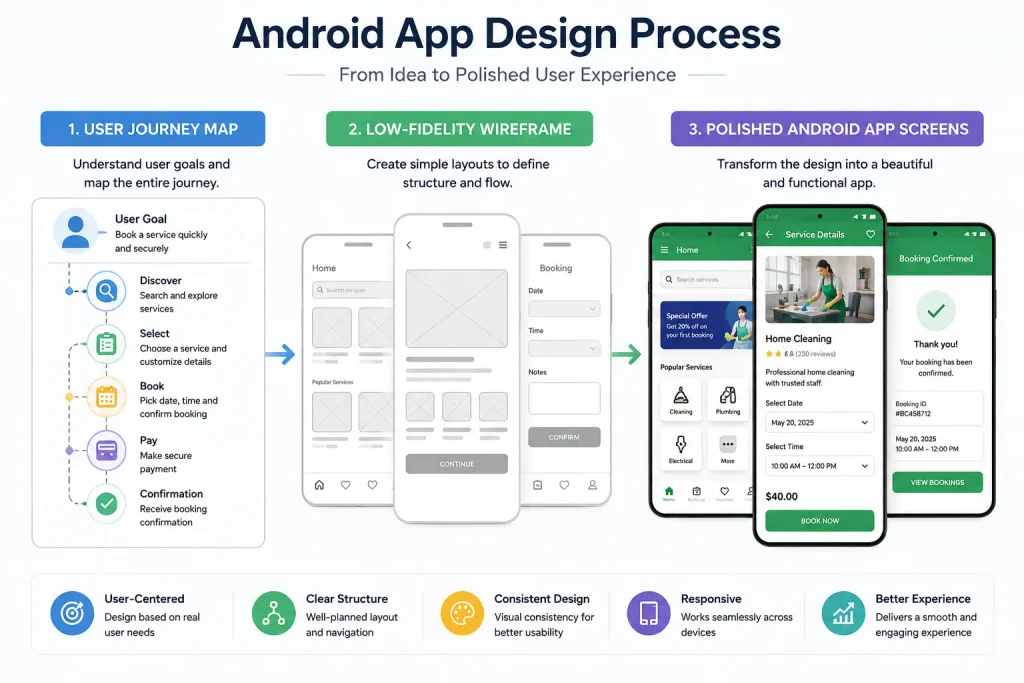
Good design helps users understand the app and complete tasks without confusion. Your Android app design requirements should reflect real user needs, not just brand preferences. Start with user journeys and wireframes. Map important actions such as registration, product discovery, checkout, and account management.
Then define the visual system, including:
- Brand colours, typography, icons, and spacing.
- Navigation structure and screen hierarchy.
- Button styles and form behaviour.
- Loading, empty, and error states.
- Accessibility and readable text sizes.
- Support for different screen sizes and orientations.
Keep navigation familiar and interactions predictable. Follow Android design guidance while maintaining your brand identity. Test early prototypes with representative users. Their feedback can reveal confusing labels, unnecessary steps, and missing information before development becomes expensive.
Identify Security, Privacy, and Compliance Requirements
Security and privacy decisions should shape development from the beginning. Don’t make them last-minute checks before release. Your Android app security requirements depend on the information your application collects and processes. A shopping app, healthcare product, and employee management tool have different risks.
Consider these safeguards:
- Use secure authentication and appropriate access controls.
- Encrypt sensitive data during transmission and storage.
- Store credentials and tokens securely.
- Validate user input and protect backend endpoints.
- Limit permissions to features that genuinely need them.
- Keep dependencies and libraries updated.
- Maintain backups and an incident response plan.
Strong Android application security also requires secure coding practices and regular vulnerability reviews.
Review applicable privacy laws based on your users and operating locations. Your data privacy compliance plan should explain what data you collect, why you need it, how long you retain it, and how users can exercise their rights.
Prepare a clear privacy policy and obtain consent where applicable. Avoid collecting information that the app does not need.
Estimate the Android App Development Budget and Timeline
A realistic app development budget should cover the complete project, not only coding.
The Android app development cost depends on feature complexity, design requirements, integrations, security needs, team location, and testing effort. A simple information app generally costs less than a marketplace or enterprise platform.
Build your estimate around these areas:
- Discovery, research, and project planning.
- UI/UX design and prototyping.
- Frontend and backend development.
- Third-party services and licensing.
- Security reviews and quality assurance.
- Google Play preparation and release.
- Hosting, monitoring, and ongoing improvements.
Avoid relying on a single estimate before defining the scope. Ask development teams to explain assumptions, exclusions, dependencies, and payment milestones. Create a timeline that includes discovery, design, development, testing, review, and launch preparation. Add contingency for complex integrations, feedback, and unexpected technical issues.
Explore more: Cost of developing an Android app
Prepare the Essential Resources for App Development
A successful project needs more than developers. It requires clear ownership, timely decisions, useful documentation, and access to business systems. Assign a project owner who can approve requirements and resolve questions. Identify stakeholders from operations, marketing, customer support, finance, and compliance.
Prepare these resources before development starts:
- Brand guidelines, logos, and design assets.
- Product descriptions, images, and other content.
- Business rules and workflow documentation.
- API documentation and integration credentials.
- Test accounts and sample data.
- Legal documents and privacy information.
- Access to hosting and analytics platforms.
If you work with an Android app development company, agree on responsibilities and communication routines. Confirm who owns the source code, design files, developer accounts, and technical documentation. Clear ownership reduces delays and prevents confusion during handovers.
Complete Android App Testing and Quality Assurance
Testing helps identify problems before users encounter them. Your Android app testing requirements should cover functionality, usability, security, compatibility, and performance.
Functional and device testing
Functional testing checks whether each feature behaves according to its documented requirements. Test registration, payments, notifications, forms, navigation, and integrations.
Performance and security testing
Performance testing checks loading times, resource use, stability, and behaviour under expected workloads. Security testing should examine authentication, permissions, data handling, and exposed endpoints.
User acceptance testing
User acceptance testing allows representative users or business stakeholders to assess real workflows. Their feedback helps confirm whether the app meets its intended purpose.
Also test:
- Different screen sizes and Android versions.
- Slow, unstable, and interrupted network connections.
- App behaviour after backgrounding or restarting.
- Permission denial and recovery scenarios.
- Installation, updates, and data migration.
Record defects, assign priorities, and retest fixes. Do not treat a successful build as proof of launch readiness.
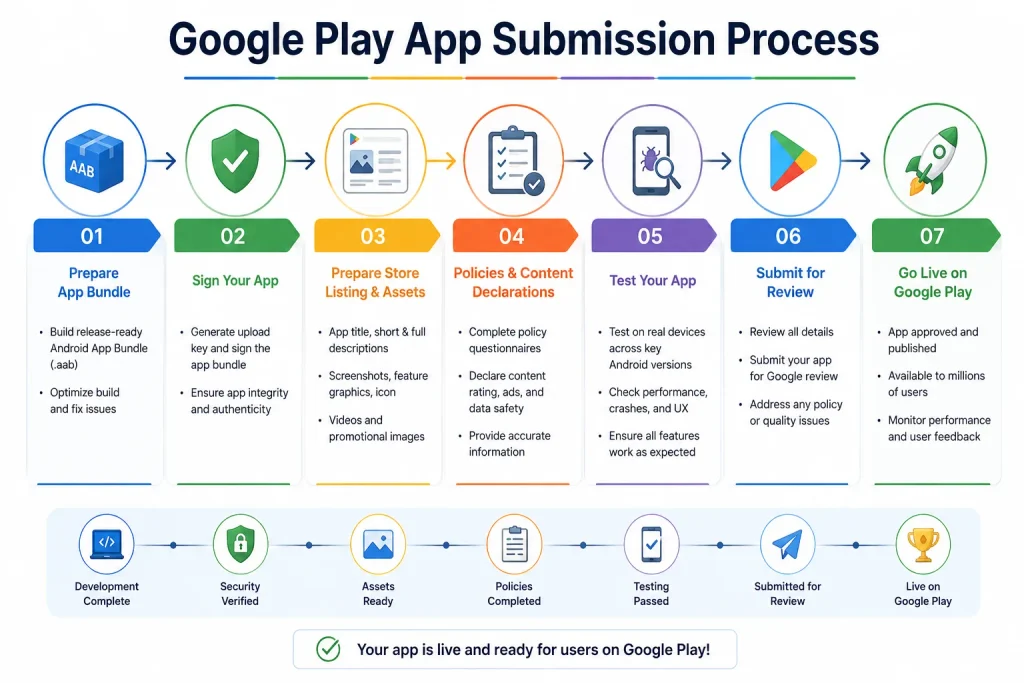
Prepare for Google Play Store Launch
Publishing requires technical preparation and accurate store information. Review the Google Play Store requirements before submitting your app. New apps and updates submitted to Google Play must target Android 16 (API level 36) or higher. Check Google’s current policy before submission because platform requirements can change.
Prepare the following items:
- A signed Android App Bundle (AAB) for Google Play.
- App name, short description, and full description.
- High-quality app icon and required screenshots.
- Feature graphic and promotional assets, where applicable.
- Content rating and target audience declarations.
- Data safety information and privacy policy.
- Reviewer access instructions and test credentials, if login is required.
Your app store listing should describe the app accurately. Avoid misleading claims, unsupported functionality, or screenshots that do not represent the actual product. Google requires a privacy policy link on the store listing and within the app. It must explain how the app collects, uses, and shares user data.
Also confirm app signing and release configuration. Google Play App Signing applies to apps created after August 2021, while the uploaded bundle still needs the appropriate upload-key signature.
One important distinction concerns testing. Personal developer accounts created after November 13, 2023, must complete a closed test with at least 12 opted-in testers for 14 continuous days. They must then apply for production access. This rule does not apply universally to every developer account.
Treat Android app deployment as a controlled release, not a final file upload. Check all declarations, permissions, content, and release settings before submitting.
Plan Your Post-Launch App Maintenance and Growth
An app launch marks the beginning of ongoing product management. User feedback, operating system updates, and changing business needs will create new work. Plan app maintenance and support before release. Assign responsibility for monitoring crashes, resolving bugs, updating dependencies, and responding to support requests.
Your post-launch plan should include:
- Crash and performance monitoring.
- Security updates and dependency reviews.
- User feedback collection and issue tracking.
- Analytics for important user journeys.
- Regular compatibility checks.
- Feature improvements based on user needs.
- Backup and recovery procedures.
Review analytics regularly to understand where users complete tasks or abandon them. Use these findings to prioritise improvements rather than adding features without evidence. Plan for application scalability as usage grows. Your infrastructure should handle expected increases in users, transactions, and data without disrupting service.
A measured app launch strategy can also help. Start with a controlled rollout when appropriate, monitor early feedback, and address critical issues before expanding availability.
Android App Development Pre-Launch Checklist: What Should Business Owners Verify?
Use this Android app launch checklist during your final project review. Confirm each item with the responsible team before approving release.
- Business goals and success measures are documented.
- Target users and their main needs are clearly defined.
- Core features and expected behaviour are approved.
- MVP scope and future enhancements are separated.
- Technical architecture and integrations are documented.
- Supported Android versions and devices are confirmed.
- Design, navigation, and accessibility checks are complete.
- Security controls and privacy disclosures are reviewed.
- Budget, timeline, and project responsibilities are agreed.
- Functional, performance, and security tests are complete.
- User acceptance feedback has been reviewed.
- Critical defects have been resolved and retested.
- Google Play declarations and store assets are ready.
- Signing, release configuration, and reviewer access have been checked.
- Support, monitoring, and maintenance responsibilities are assigned.
This final review brings the main Android app development requirements together. It also helps business owners identify unfinished work before users encounter it.
Final Thoughts
A successful Android launch starts with clear business goals and realistic preparation. Owners need to align features, technology, design, security, budget, testing, and publishing requirements. Use this Android app development checklist as a working document throughout the project, not just before release. Review it with your developers and business stakeholders at every major milestone.
A structured approach helps teams control scope, reduce avoidable rework, and build an app that reliably serves users. Most importantly, it gives your business a clear foundation for ongoing improvements after launch.