


Your application is now operational, and a promotional campaign has attracted thousands of new users. However, bookings are failing to complete because your pages are starting to slow down. This can frustrate customers and increase booking abandonment. Without proper Flutter app scalability planning, a promising growth opportunity can quickly turn into lost revenue and reduced customer trust.
This guide explains the key decisions to make during Flutter app development, from choosing an architecture that supports growth to preparing your backend, optimising databases and testing performance under heavy workloads. You’ll also learn how to identify bottlenecks and plan scaling strategies that help your app accommodate more users without driving up costs or compromising reliability.
Why Should Businesses Plan for App Scalability Early?
Mobile apps remain a significant business channel. According to Sensor Tower’s State of Mobile 2026 report, users spent an estimated 5.3 trillion hours on iOS and Google Play mobile apps in 2025, a 3.8% increase year-on-year. In-app purchases and paid apps generated $167 billion in revenue, marking a 10.6% rise.
These figures highlight the importance of delivering a fast and reliable mobile experience. If your app is slow or unreliable, users may abandon it, which could lead to lower revenue and reduced customer confidence.
Effective mobile app scalability planning does not mean you need to build complex infrastructure. It just means that you can find out which parts of your application are likely to experience increased demand, then address the potential bottlenecks. This approach helps you invest in scalability where it is genuinely needed, avoiding unnecessary costs and complexity.
What Does Flutter App Scalability Mean?
Scalability is an application’s ability to accommodate growth in users, transactions, and functionality without compromising performance, reliability, or usability.
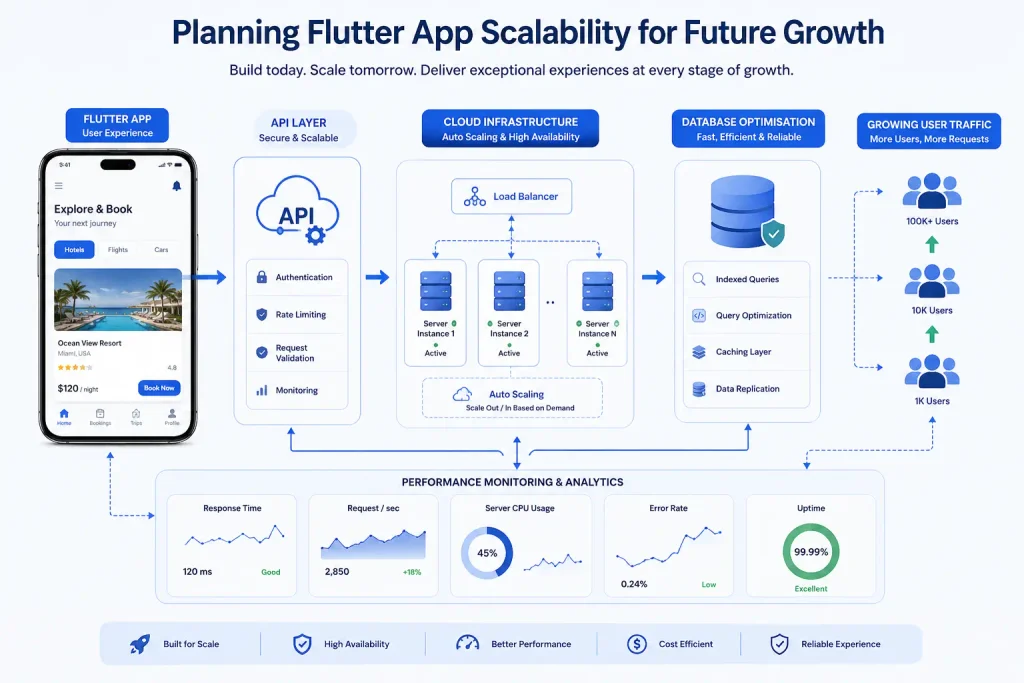
Although Flutter provides a cross-platform mobile framework, its scalability depends on the capacity of the entire system. To cope with increased demand, its APIs, database, authentication services, and hosting must all operate together seamlessly.
A scalable Flutter app should be able to handle growth, support new features, and let the team expand capacity without having to rebuild the product from the ground up. The aim of Flutter app scalability planning is to make practical technical decisions based on expected demand, business priorities and available resources.
Explore more: How much does Flutter app development cost
What Should You Determine Before Your User Base Expands?
A well-planned Flutter app should be able to handle a growing user base without compromising speed, reliability or the overall user experience. Selecting the appropriate app architecture, backend features, and performance improvements early in Flutter app development can help you avoid expensive rework when user demand grows.
1. Choose an Architecture That Can Grow
Your Flutter app’s architecture should support new features and code updates. Separate the user interface (UI), business logic and data layers to make the codebase easier to maintain. Create a structure that suits your current needs, yet also build it with future growth in mind.
2. Plan for Backend Capacity
Ensure your app has a scalable backend. Check that APIs respond quickly, servers can handle rising request volumes, and infrastructure can absorb traffic spikes. Select services that enable cloud scalability, so you can add resources as demand increases.
3. Prepare Your Database
As your data grows, performance becomes a significant concern. Optimise your database by reviewing its data structure, indexing frequently queried fields and improving query efficiency. Add indexes to commonly searched fields and try to reduce the number of requests made. Caching can be used wherever possible.
4. Set Performance Targets
Decide how quickly important screens should load and how reliably key features must work. Use performance monitoring and regular testing to identify bottlenecks before they affect customers.
5. Keep Your Code Easy to Maintain
By following best practices such as automated testing, clean code and regularly updating dependencies, your team will be able to add new features efficiently and reduce costly fixes.
How Do You Pick the Right Scaling Strategy?
Selecting the appropriate scaling strategy begins with recognising where your app falters when demand rises. An experienced Flutter app development company can evaluate your application’s performance and help you address technical limitations before they affect users.
Step 1: Identify the Cause of Your App’s Performance Issues
Monitor your application, database and backend to identify performance bottlenecks. Measure API response times, server resource consumption and screen load speeds to see where delays arise and which areas require improvement. This enables you to rank fixes based on actual performance data rather than guesswork.
Step 2: Increase Existing Server Capacity
If a server or database is running out of resources, consider vertical scaling. Vertical scaling increases a server’s processing power, memory or storage capacity to handle higher workloads. However, this approach has limitations.
Step 3: Distribute Workloads Across Multiple Servers
If a single server struggles to handle increasing demand, consider horizontal scaling. This means adding additional servers or instances so that workloads are distributed and higher traffic can be handled efficiently. This approach needs to be supported by your application architecture as well as your infrastructure.
Step 4: Reduce Unnecessary Processing
Cache frequently accessed data and static resources where appropriate. Consider using a content delivery network for suitable static content. Also try to carry out slow processes in the background (such as report generation and image manipulation).
Step 5: Separate Services When Needed
As your application grows, a single backend service may become difficult to maintain or scale efficiently. Consider separating resource-intensive functions, such as notifications, payment processing and report generation, when performance data and operational needs justify doing so.
However, microservices are not necessary for every application. A modular monolith may be easier to maintain and operate during the early stages of growth. Choose an architecture that balances scalability, reliability and operational complexity.
Step 6: Test, Measure and Improve
After implementing a scaling change, run load tests and compare the results with your original performance targets. Monitor API response times, error rates, database query performance, server resource usage and infrastructure costs.
Use these measurements to determine whether the change has improved performance and whether further adjustments are needed. Scale incrementally where practical, prioritising improvements supported by performance data rather than rebuilding the application unnecessarily.
Explore more: Benefits of Flutter app development
Key Checks Before Scaling Your App
Before a major update or an increase in traffic, ensure that your application and infrastructure are able to handle the additional demand. Addressing performance issues and technical debt early can help reduce downtime, control costs and maintain a reliable experience for your users.
- Tested expected traffic and workloads beyond the normal forecast.
- Set infrastructure budgets and spending alerts.
- Automated important tests and deployment steps.
- Configured appropriate request timeouts, retries and rate limits.
- Enabled crash reporting and latency dashboards.
- Prepared and rehearsed a rollback plan.
- Identified who will respond to production incidents.
- Documented the main capacity limits and upgrade triggers.
Following this checklist gives your team a practical foundation for preparing the app for growth without adding unnecessary infrastructure or complexity.
What Does a Scalable Build Cost?
The cost of building a scalable app depends on its features, integrations, security requirements, backend complexity and expected user demand. The following figures are illustrative estimates, not fixed quotations, as actual costs vary depending on the project scope and technical requirements.
| Workstream | Indicative timeline | Indicative cost |
| Scalability audit and architecture review | 1–3 weeks | £5,000–£15,000 |
| Scalable MVP with managed backend | 3–5 months | £40,000–£90,000 |
| Backend and data-layer upgrade for an existing app | 2–4 months | £30,000–£80,000 |
| Cloud, monitoring and ongoing support | Monthly | £1,500–£6,000+ |
The final cost depends on the project scope, existing technical limitations and service usage. Flutter application development can share much of the codebase across iOS and Android, allowing more of the budget to be allocated to backend design, testing and data management where needed. A well-planned caching strategy can also reduce repeated data requests and help control infrastructure costs as usage grows.
Clearly separate your costs into development, hosting, maintenance and support so you can make informed budget decisions and compare different options more easily.
What Are the Business Benefits of Planning for Growth?
A well-planned approach to mobile app scalability helps businesses maintain customer satisfaction, control operating costs and support future product development. It also improves Flutter app performance, helping the application remain responsive as demand increases.
- A more dependable experience: Customers will be able to perform essential tasks without encountering too many delays or distractions.
- Predictable costs: Planning for capacity allows teams to make sure that neither excessive nor insufficient infrastructure investment takes place.
- Quicker feature releases: A well-structured codebase will enable the introduction of new features to the product.
- Risk mitigation: Teams can detect bottlenecks through testing and monitoring processes and avoid further disruptions.
- Flexibility: The product can adapt to new markets and customer needs without requiring major architectural changes.
Common Challenges When Scaling a Flutter App
As your application grows and gains more users, the increase in demand will start to highlight any architectural issues you have within the backend and infrastructure of your application. It is important to identify these challenges to help you prioritise improvements that will ensure a smooth user experience.
- Slow response time in applications: Screens may take longer to load, and requests may become slower when many users access the application simultaneously. Poor API performance can further delay data retrieval and user interactions.
- Overloading of the backend: Server resources may struggle to handle rising request volumes, causing timeouts or failed transactions. Planning for backend scalability helps your infrastructure accommodate more users while maintaining reliable service.
- Database problems: Inefficient queries and growing data volumes can slow data retrieval and affect overall application performance. Regular database optimisation, including indexing frequently searched fields and improving query efficiency, helps maintain responsiveness as demand increases.
- Unexpected infrastructure costs: Upgrading cloud infrastructure without proper monitoring might result in higher operational costs than expected.
- Surges in traffic: Campaigns, marketing efforts, or a new product release might cause a sudden increase in traffic that will surpass the server’s capacity.
- Third-party integration limitations: External services and APIs used might cause certain restrictions that would affect the application.
Future-Ready Strategies Worth Considering
Planning ahead can help you avoid costly updates and performance issues as your app grows. During Flutter app development, prioritise flexible cloud infrastructure, efficient APIs, automated testing and regular dependency updates. These measures support app performance optimisation while making your application easier to adapt to traffic increases and new features.
Keep your technical decisions aligned with your product roadmap, so you can improve performance and expand functionality without introducing unnecessary complexity.
Final Thoughts
Growth should not force your team into rushed technical decisions. Estimate expected workloads, select the proper architecture, set up your backend and database, and test everything in advance before traffic increases.
Flutter app scalability planning should be an ongoing process. Analyse the performance statistics of your product at different stages, resolve any issues that you have found, and add more resources where required. Plan for growth before performance becomes a problem. Connect with IIH Global to review your app’s scalability, prioritise improvements and build a roadmap for future demand.