


The launch of iPhone 18 Pro and iPhone Duo gives businesses a new reason to rethink their mobile strategies. For companies planning iPhone 18 Pro app development, the focus is no longer limited to screen resolution or processor speed. Apple is pushing camera capabilities, on-device intelligence, performance, and flexible displays further than before.
For businesses, this means iPhone app development can become more closely connected with AI, richer media, adaptive interfaces, and new ways of completing tasks. The iPhone 18 Pro uses Apple’s A20 Pro chip, while iPhone Duo introduces Apple’s first foldable iPhone experience.
These changes create opportunities, but they also introduce new design and testing requirements. Businesses that start planning early can build products that work well across conventional and foldable iPhone experiences.
iPhone 18 Pro: Features and Advancements
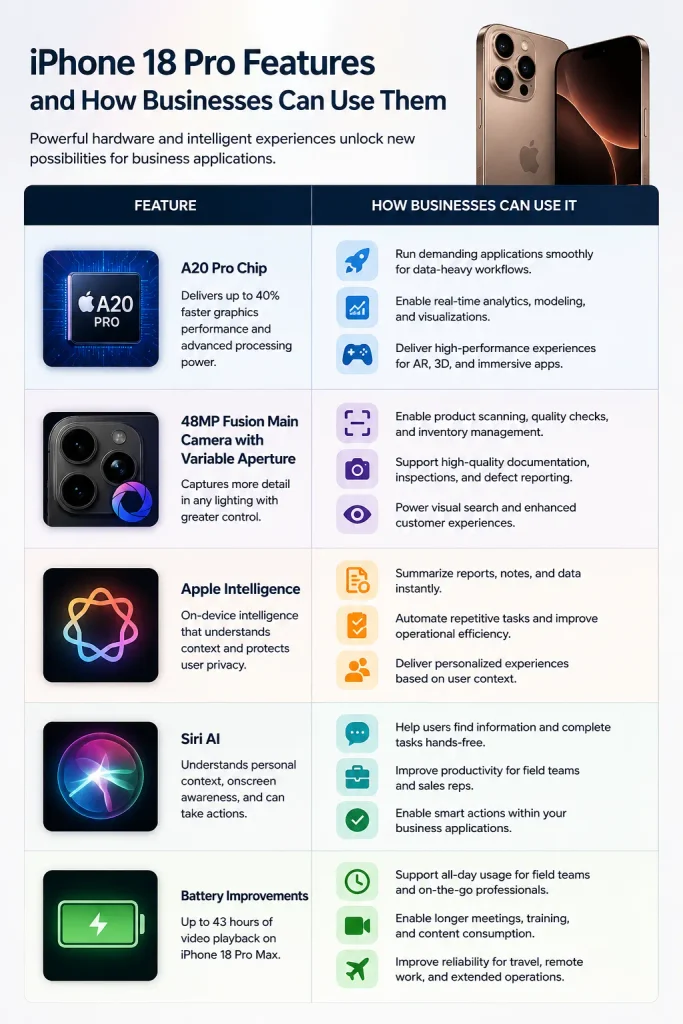
The iPhone 18 Pro features several upgrades that can influence how businesses approach apps. Apple has introduced a 48MP Fusion Main camera with variable aperture, improved performance through the A20 Pro chip, and stronger support for on-device intelligence.
The A20 Pro also includes a Dual 16-core Neural Engine. Apple says the chip delivers up to 40% faster graphics performance than the previous Pro generation. These improvements can support demanding workflows, real-time processing, AI features, and media-heavy applications.
For companies considering the iPhone 18 Pro for business, the camera upgrade can be especially useful. Retail, property, healthcare, education, logistics, and field-service applications can use advanced imaging for product scanning, documentation, visual search, inspections, or customer experiences.
Battery improvements can also support longer usage. Apple states that iPhone 18 Pro Max can deliver up to 43 hours of video playback under its testing conditions.
AI creates another development opportunity
Apple Intelligence and Siri AI are important parts of the new experience. Apple says Siri AI can understand personal context, use onscreen awareness, and take actions related to information displayed on the device.
This opens possibilities for Apple Intelligence apps that help users summarise information, find records, complete tasks, or interact with business services more naturally.
For example, a sales app could help a representative find customer information while viewing a conversation. A field-service app could help technicians understand job instructions without navigating through multiple screens.
iPhone 18 Pro app development: What businesses should plan for
Businesses should treat iPhone 18 Pro app development as more than a device-specific upgrade. The better approach is to identify which new hardware and software capabilities genuinely improve the customer journey.
Camera-intensive applications can benefit from improved imaging. AI-powered products can explore on-device intelligence. High-performance applications can use the additional processing headroom for demanding tasks.
At the same time, companies should avoid adding features simply because the hardware supports them. Every capability should solve a clear customer or operational problem.
That principle also applies to iOS app development more broadly. A strong application should remain useful on supported devices instead of becoming dependent on one model.
iPhone Duo: The Revolutionary Foldable iPhone
iPhone Duo introduces a completely different form factor. Apple describes it as its first foldable iPhone, with a 7.6-inch inner display and a 5.4-inch outer display. The device supports multiple positions and orientations, including partially folded and standing configurations.
The iPhone Duo features create opportunities for applications that need more space without moving users to a tablet. Apple specifically highlights side-by-side apps, flexible viewing angles, and multitasking. This makes iPhone Duo app development particularly interesting for productivity, finance, media, education, retail, travel, and enterprise applications.
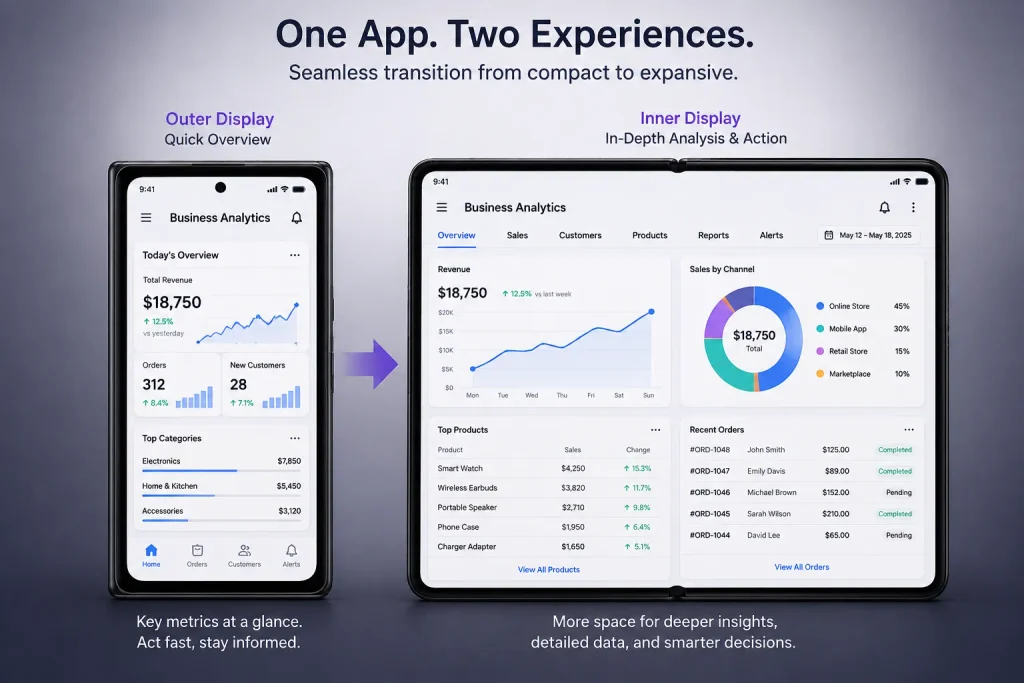
Consider a business analytics application. The outer display could show a quick dashboard, while the larger inner display could present detailed charts, filters, and reports.
Designing for multiple display states
Apple’s developer guidance recommends adaptive layouts rather than creating separate designs for every device pose. Developers should use size classes, safe areas, and flexible layout systems instead of fixed screen assumptions.
This is where adaptive iOS app design becomes important. The application should respond naturally as the available space changes. A good responsive iOS app design can allow the same interface to transition from a compact outer display to a larger inner display without making users relearn the application.
Explore more: Complete iOS app development guide
Potential impact on businesses and their mobile app strategies
The arrival of these devices can influence business app planning in several ways.
First, companies need to think beyond traditional iPhone screen sizes. Apple now provides a broader range of display environments, especially with iPhone Duo.
Second, businesses need to consider how people complete tasks when more screen space becomes available. Larger layouts can support dashboards, comparison tools, document workflows, media controls, and multi-step processes.
Third, businesses can use device capabilities to differentiate their digital products. A travel company could provide richer itinerary views. A property application could show photos, maps, floor plans, and property details together.
For enterprise users, iOS app development for businesses can also benefit from better multitasking. Employees may review information while keeping another task visible.
Apple’s developer documentation specifically highlights Split View and adaptive navigation for iPhone Duo. Standard components such as NavigationSplitView can automatically adjust between compact and expanded layouts.
Rethinking the user journey
Businesses should not simply stretch an existing application across a larger screen. They should reconsider which information deserves more space.
For example, a banking app could keep account balances and essential actions visible on the outer display. The inner display could provide transaction analysis, financial insights, and detailed account information. This approach makes business iOS apps more useful without creating unnecessary complexity.
How businesses can adapt and leverage the new features
1. Build around flexible layouts
Flexible interfaces should become a core part of future iPhone app development projects. Avoid hard-coded widths and layouts that assume one screen configuration.
Apple recommends using size classes and standard layout systems for iPhone Duo. Its guidance also recommends avoiding fixed dimensions and adapting content around reserved areas created by cameras and the folding region. This approach helps developers create flexible app layouts that work across changing display conditions.
2. Support AI-driven experiences
AI can make business applications more useful when implemented around real workflows.
A customer support app could summarise conversations. A sales application could surface relevant customer information. A productivity app could help users turn notes into structured tasks.
Siri AI integration can add another interaction layer. Apple says Siri AI can use onscreen awareness and personal context to help users complete actions. Businesses should therefore identify workflows where voice or natural-language interaction saves users time.
3. Prepare for richer multitasking
The larger iPhone Duo display creates new possibilities for multitasking in iOS apps. Productivity applications can show related information together instead of forcing users to switch repeatedly between screens.
A project management app could display tasks beside project details. A commerce application could show product information beside a comparison list. These experiences can make foldable iPhone apps more valuable than simply providing a larger version of an existing interface.
4. Choose the right development technology
Businesses can use SwiftUI app development when building modern interfaces that need strong adaptability across Apple platforms. SwiftUI also provides tools for responsive layouts and newer Apple interface patterns.
Existing products may continue using UIKit app development, particularly when they have mature codebases or custom components. For companies starting new projects, the choice should depend on the application’s requirements, existing technical expertise, maintenance plans, and target Apple platforms.
Apple also provides current development tooling through Xcode 27. Developers preparing applications for iPhone Duo can use Xcode and Device Hub to simulate different device poses and display configurations.
Explore more: Why Choose iOS App Development
iPhone Duo app development and the future of iOS
The introduction of iPhone Duo makes iPhone Duo foldable app development a practical consideration rather than a speculative concept.
Apple says existing apps can run on iPhone Duo, even without being built specifically for the iOS 27 SDK. However, developers can improve the experience by adopting the latest SDK and supporting the device’s expanded screen space.
This means businesses do not necessarily need to rebuild an entire application. In many cases, the better strategy involves auditing the existing interface, identifying rigid layouts, and improving resizing behaviour.
For new products, iOS app development should consider adaptability from the beginning. This can reduce future redesign work as Apple expands its device range. The same principle applies to mobile app development for iPhone in general. Designing for flexibility today can make future device transitions easier.
Challenges and Considerations
New hardware always creates additional development work. Businesses should consider several areas before committing to new device-specific experiences.
1. App compatibility
iPhone app compatibility needs careful attention when supporting multiple generations of iPhones. Developers must identify which features require newer hardware and provide suitable alternatives for older supported devices.
2. Testing different layouts
Foldable hardware introduces more states to test. iOS app testing should cover the outer display, inner display, different orientations, partially folded states, split-screen configurations, safe areas, and transitions. Apple recommends using Xcode’s Device Hub to simulate opening, closing, rotating, and folding iPhone Duo.
3. Performance
More advanced experiences can increase processing, memory, and battery demands. Teams should monitor startup time, animation smoothness, network usage, and memory consumption. Good app performance optimisation should remain part of the development process rather than becoming a final-stage activity.
4. Development and maintenance costs
Supporting additional devices can increase design, development, testing, and maintenance requirements.
Businesses can reduce unnecessary costs by creating reusable components and adaptive layouts. Instead of building separate applications for each device, teams can maintain a shared codebase with device-aware interfaces.
Companies that lack internal Apple development expertise can also hire dedicated iPhone app developers to support upgrades, new features, testing, and long-term maintenance. When businesses need broader technical support, a capable iPhone app development company can help assess the existing application and create a practical upgrade roadmap.
5. App Store and SDK planning
Development teams should also keep their tooling current. Apple states that Xcode 27 supports the latest SDKs, while its upcoming App Store submission requirements include building iOS apps with the iOS 27 SDK or later from April 2027. That makes Xcode 27 app development relevant for businesses planning products that need long-term App Store support.
Explore more: How much does iOS app development cost
Conclusion
iPhone 18 Pro and iPhone Duo give businesses new ways to think about digital products. One pushes performance, cameras, AI, and intelligent interactions forward. The other introduces a flexible display experience that changes how users interact with an iPhone.
For businesses planning iPhone 18 Pro app development, the priority should be creating useful experiences around these capabilities rather than chasing specifications.
At the same time, foldable devices make adaptable design increasingly important. Companies that invest in flexible interfaces, thoughtful AI features, strong testing, and reusable architecture can create future-ready iOS apps that respond to Apple’s changing hardware landscape.
The biggest opportunity is not simply supporting another iPhone model. It is designing applications that can evolve with the way people use their devices.