


A minor issue in your application today can become a major problem tomorrow. A feature that used to take weeks to develop is now taking months. Bugs you thought you fixed keep returning, while outdated libraries become harder to maintain and may be incompatible with newer technologies. If this sounds familiar, it may be time to consider upgrading your application. A well-planned React Native app upgrade can address these issues, improve maintainability and reduce the risk of future problems.
As React Native evolves, Apple’s App Store and Google Play’s requirements are changing. However, that does not mean that you will be forced to rebuild your application from the ground up every time changes occur. This article explains when you need to upgrade a React Native app, what affects the cost, and how experienced developers can help you choose the right approach for your business.
Why Upgrading Matters More Than Ever
Keeping your app running is not enough if the technology behind it is becoming outdated. React Native continues to evolve, with new releases introducing breaking changes, features and improvements that can affect application performance, compatibility and long-term support. For example, React Native 0.82 runs exclusively on the New Architecture.
A planned React Native app upgrade helps resolve dependency issues, reduce technical risks, and maintain the app’s performance, compatibility and long-term relevance. However, if the project’s architecture has serious flaws that limit performance and make the introduction of new features difficult or impossible, React Native app modernisation will produce significantly better results. Addressing technical debt early can reduce the need for expensive, time-consuming refactoring later.
When Should Businesses Modernise an Existing App?
An app that powered business growth could become a liability as new technologies and customer demands emerge. React Native app modernisation can help address these challenges before they affect your operations, costs or growth. The following six signs can help you determine whether your app needs targeted improvements or broader modernisation.
1. New Features Take Too Long to Develop
If updates take too long to deliver, legacy code, outdated dependencies or an overly complex setup could be to blame. An experienced team can identify them and enhance the efficiency of your future React Native development.
2. Bugs Keep Returning
Repeated fixes that introduce new bugs often indicate deeper technical problems. Review code quality, test coverage and third-party libraries to identify issues affecting the application’s security and reliability.
3. Performance Is Affecting Users
Slow loading times, poor responsiveness and frequent app crashes can all negatively affect the user experience. Analysing the app’s performance can help determine whether targeted fixes or broader modernisation would be more effective.
4. Technology Is Falling Behind
Outdated app technology can create problems with app compatibility as React Native and mobile platforms evolve. A scheduled React Native version upgrade helps tackle compatibility risks, while examining operating system updates, native modules, and API integration helps keep the app compatible with evolving technical requirements.
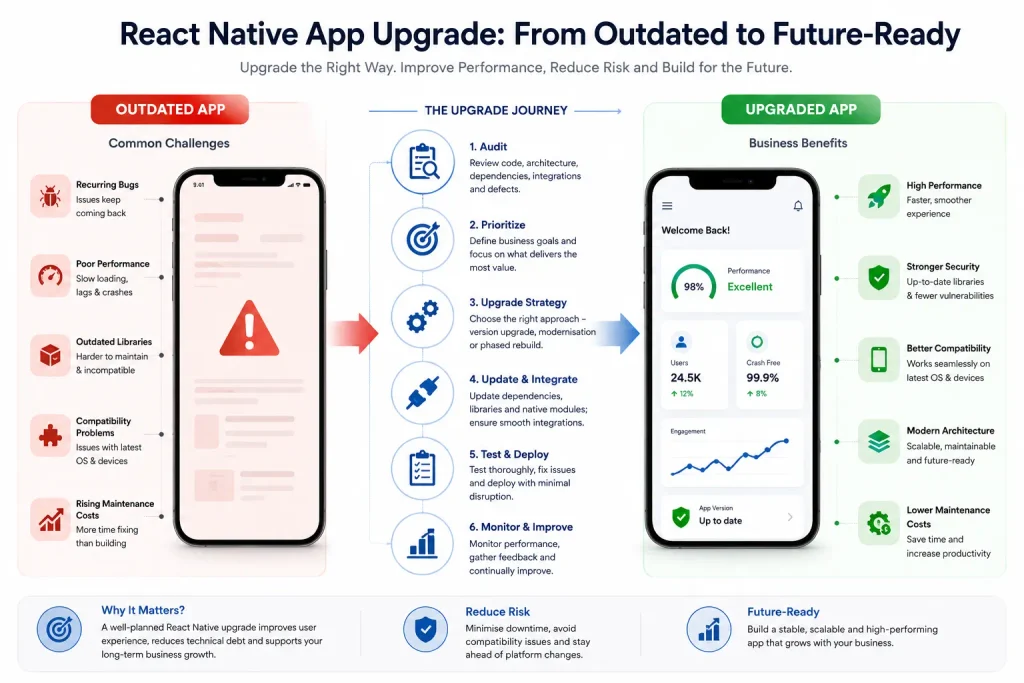
5. Maintenance Costs Keep Rising
When developers spend more time fixing problems than building features, technical debt can increase app maintenance costs. A well-organised React Native app maintenance plan helps teams set priorities for fixes and determine when to upgrade React Native app components instead of swapping out the whole system.
6. Your Business Needs Have Changed
As your company grows, new business requirements may demand better scalability, integrations or functionality. Reviewing your existing React Native app can help determine whether targeted improvements, a migration or broader modernisation is the most appropriate option. The decision should support your long-term cross-platform app development strategy, not simply replace old technology.
Before making a significant investment, evaluate your application’s technical limitations, business goals and future roadmap. The right app upgrade service will help you find a pragmatic approach, manage risk and invest in the improvements that will bring you long-term value.
Explore more: Why React Native is ideal for mobile app development
How to Upgrade a React Native App: A Step-by-Step Guide
A structured approach helps control costs, minimise disruption and reduce the risk of introducing new issues while resolving existing ones.
1. Audit the current application
Begin with a technical review of the code, architecture, dependencies, integrations, and defects. Thoroughly analyse and document the project’s strengths and weaknesses, then use these findings to guide the upgrade and minimise rework.
2. Define the business priorities
Define what you want to achieve with the upgrade. Your goals might include reducing crashes, simplifying the checkout process, supporting newer devices or preparing for an upcoming release. This will help your team to prioritise the updates and distinguish essential improvements from optional enhancements.
3. Choose the right upgrade strategy
A targeted React Native version upgrade may resolve compatibility or framework-related problems. A broader modernisation project may require architectural changes, library replacements or improvements to how the application manages data and navigation.
If the current codebase is difficult to maintain, consider a phased modernisation or rebuild. Use the official React Native Upgrade Helper to compare version changes, then assess how those changes affect your application.
4. Update dependencies and integrations
Ensure that third-party libraries, native modules, and API connections are compatible, actively maintained and secure; update unsupported libraries and test external services before deploying updates to production.
5. Implement changes in stages
Start with a well-defined part of the app, validate the changes and expand the rollout if the results are positive. Track all changes in version control and maintain a rollback plan in case problems arise.
6. Test before releasing
Run functional, regression, performance and security tests across supported devices. Validate important user journeys, including registration, payments, notifications and account access. Resolve critical defects before deployment.
7. Monitor the release
After launch, monitor crash rates, response times, customer feedback and relevant business metrics. It’s wise to introduce new features gradually so that you can troubleshoot any issues before rolling them out to all of your users.
How Much Does a React Native App Upgrade Cost?
The cost depends on several factors, including your app’s current condition, the number of integrations, code complexity and testing requirements. Simple dependency updates may cost less than extensive architectural changes. The original React Native app development approach and code quality can also affect the time and effort needed to upgrade an existing app.
The figures below are rough estimates for UK budgeting, not fixed rates or guaranteed market averages. A technical audit can help define the scope of work and establish a realistic budget before you begin.
| Upgrade scope | Pricing | Typical work |
| Minor update | £1,500–£4,000 | Small dependency updates, targeted fixes and basic regression testing |
| Standard upgrade | £4,000–£12,000 | Framework updates, library replacements and compatibility improvements |
| Major modernisation | £12,000–£30,000+ | Extensive refactoring, architecture changes and broader testing |
| Complex migration | £25,000–£60,000+ | Significant redevelopment, integration changes and phased transition |
These figures are indicative starting points for budgeting and should not be treated as a formal project quotation. The cost could be higher if the application contains undocumented code or has integration issues or security vulnerabilities.
To approve the budget, ask for a detailed breakdown of the costs associated with development, testing, deployment and ongoing maintenance.
Explore more: Guide to choosing a React Native development company
Upgrade, Modernise or Migrate: Which Approach Is Right for You?
Your app does not always need a complete rebuild. The right choice depends on whether its current structure can support your next stage of growth.
| Approach | Suitable for | What it involves |
| Targeted upgrade | The app works well but needs technical updates | Updating versions, dependencies and specific components |
| Modernisation | The app has wider performance or maintenance problems | Refactoring code, improving architecture and replacing outdated components |
| Migration | The current implementation cannot meet essential business needs | Moving significant parts of the application to a new architecture or implementation |
A migration may be appropriate if the existing implementation cannot meet essential business requirements. However, such projects usually require more time to plan, test and validate the required functionality.
For many businesses, targeted improvements to the existing application are more cost-effective than a complete rebuild. This approach allows teams to address technical problems while continuing to deliver new features. This is particularly important for growing organisations that need to spend their budget wisely and release new features instead of rewriting the code.
What should you consider before modernising your app?
Before starting, make sure your plan covers the following areas:
- Security: Examine the app’s security, permissions, data handling, and any vulnerable dependencies.
- Architecture: Evaluate scalability and whether the existing design can handle the growth you have planned.
- Platform support: Determine which mobile platforms and OS versions you want to support.
- Integrations: Make sure you will be able to connect payment providers, analytics, and other services.
- Budget: Set aside money for addressing issues, testing, and compatibility problems.
- Future development: Ensure the app update will satisfy your long-term product goals.
- Ongoing support: Determine who will maintain the software and provide end-user support after launch.
How to Measure the Success of an Upgrade
A successful release does not automatically mean the upgrade has achieved its goals. Success needs to be measured in the context of a defined baseline established before development begins.
- Reliability: The number of crashes and failed transactions.
- Performance: Evaluate mobile app performance, startup time, and screen responsiveness.
- Customer experience: Complaints, task completion, or abandonment rates.
- Development and operational efficiency: Ability to make changes with reduced defects and rework.
- Business metrics: Conversion rates, retention, or other metrics relevant to the objective of the release.
These measures help you establish whether the investment has delivered meaningful improvements rather than simply moved the app to a newer version.
Ending Note
A well-planned React Native app upgrade can resolve existing issues, improve performance and prepare your application for future growth. Addressing technical problems early can reduce maintenance costs and make future development easier.
IIH Global offers React Native app development expertise to help businesses assess their applications, prioritise improvements and plan upgrades around their goals and budget. The right app upgrade services help you decide what to retain, improve or replace without investing in unnecessary redevelopment. A clear upgrade plan keeps your focus on changes that deliver lasting value.
Contact IIH Global to discuss your application’s current challenges and explore an upgrade strategy that aligns with your business goals and budget.