


Every leader who has funded a mobile product knows how frustrating a rushed development process can be. The app launches, users arrive, and then every new feature takes twice as long as planned. Often, the underlying problem lies beneath the screens: the Android app architecture, which determines how your product evolves, performs and adapts to change.
The UK mobile application market is growing, with an expected compound annual growth rate of 14.1% from 2026 to 2033. This growth presents opportunities for businesses looking to reach new customers through mobile applications.
Before committing a budget to Android app development, there are several factors to consider. Architecture is both a business and a technical decision. This guide explains what you need to decide and why.
Why Architecture Belongs in the Boardroom
Think of architecture as the floor plan of a building. You need an approved plan before construction begins. Likewise, you need an approved structure before beginning the coding. Yet many companies start the work without securing alignment among key stakeholders. The result is rework, delays and budget overruns.
A well-designed Android app architecture supports three key business priorities: speed to market, cost control and flexibility to adapt. It can help business leaders achieve measurable results. For example, a CFO gets predictable spend, a CMO gets faster campaign features and a CTO gets fewer production fires. Sound mobile app architecture gives every leader a reason to invest.
The Three Layers Every Business App Needs
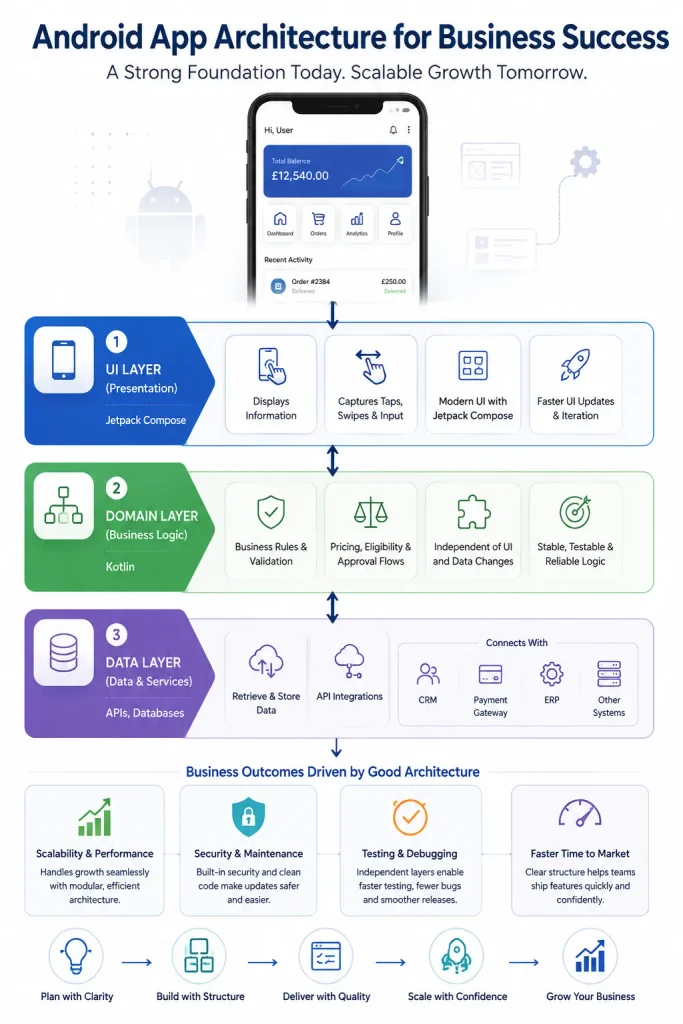
Most modern Android applications benefit from a layered architecture. Each layer has a clearly defined responsibility, and this discipline is called a separation of concerns. When layers stay independent, teams can change one part without breaking the rest. The layers are as follows:
1. UI Layer
This layer displays information and captures taps, swipes and input. Modern applications are often built with Jetpack Compose, which is Google’s modern toolkit for declarative screens. It can help teams develop and update interfaces more efficiently. This is useful when requirements change quickly, such as when marketing wants a new onboarding flow next week.
2. Domain Layer
This layer holds your business rules, such as pricing logic, eligibility checks and approval flows. A separate domain layer is optional in smaller applications, but it proves highly valuable in more complex ones. The rules kept here stay stable even when screens or databases change.
3. Data Layer
This layer’s primary responsibility is to retrieve and store data from servers and local databases. It also handles API integration with your CRM, payment gateway, ERP or existing systems. A well-designed data layer improves maintainability and simplifies integrations. This is helpful in various situations, including when you need to swap vendors without rewriting the app.
Explore more: Is Android app development worth it for your business?
Android App Architecture Patterns Compared
Choosing the right architecture pattern can be challenging for many business owners. Several Android architecture patterns are available, each offering different benefits and trade-offs. Here is a simplified comparison.
1. MVVM Architecture
MVVM is a widely used approach for structuring modern Android applications. A ViewModel manages UI-related state and logic, connecting the screen with the relevant data or domain layer. It can retain UI state across configuration changes, such as device rotations, and helps make that logic easier to test.
2. Clean Architecture
This architecture goes further by enforcing strict dependency rules, so core business logic never depends on outer frameworks. It requires additional upfront effort, but it can pay off over the lifetime of large applications with many contributors. It can support scalability as business requirements evolve.
3. MVI Architecture
This architecture has a strong focus on state management. It treats each screen as a single state that changes only through defined events. This creates unidirectional data flow, which makes behaviour predictable and bugs easier to trace. It works well for apps with complex UI and real-time screens, such as trading or logistics dashboards.
Which Pattern Fits Your Business?
Selecting the best architecture pattern for your app is about starting with your product requirements, not with what’s trending. Android app architecture for business works best when the pattern follows the roadmap. A focused app with a small team can thrive on a simple setup. A platform with several modules and regulatory pressure usually needs stricter layering. A good partner explains these trade-offs in business terms and documents every decision.
How Architecture Shapes Business Results
Good Android app architecture shows up in results your board can measure. It influences operating costs, speed to market, stability and the ability to scale. It is not just a technical choice, but a business one that decides what you can build, maintain, and capitalise on in the future. Here are some ways architecture influences business outcomes:
1. Scalability and Performance
A scalable Android app can accommodate growth in user demand without requiring a major architectural rewrite. Planning for app scalability means modular code, smart caching and backend services that grow on demand. Good architecture can make performance easier to monitor and optimise, although actual improvements depend on implementation and testing. These details influence business ratings, customer retention and revenue.
2. Security and Maintenance
Security should be built into the architecture from the outset, rather than added as a last-minute fix before launch. Addressing security from the outset helps teams plan for secure data storage, authentication, authorisation and sensitive-data handling before these concerns become expensive to retrofit. The same principle applies to ongoing app maintenance. A well-organised codebase can help new engineers become productive more quickly, and updates ship with less risk.
3. Testing and Debugging
Layered design speeds up testing and debugging because each component can be checked in isolation. Fewer defects reach customers, and your support team spends less time firefighting.
Explore more: How to find the best Android app development company
Questions to Ask Before You Hire a Team
Asking the right questions helps you select the right team for building your app. Before approving a budget, put these questions to every vendor:
- Which Android app architecture will you use, and why does it fit our roadmap?
- How will the design use Kotlin and stay ready for future Android versions?
- What does your Android app development process look like, from discovery to release?
- How will you document decisions so we are never locked in?
Clear, well-supported answers can indicate that a partner has relevant experience. By contrast, vague answers may indicate potential risks. Experienced Android app developers should be able to answer these questions clearly, so use their responses to inform your decision.
Final Thoughts
Every strong product starts with a plan that leaders understand and developers respect. Clear Android app architecture for business reduces risk, controls cost and keeps your roadmap flexible. A sound architectural foundation can help improve long-term ROI by reducing avoidable rework and supporting more maintainable development.
If you’re planning for Android app development and want an architecture that scales with your ambitions, IIH Global can be your delivery partner. We help with architecture decisions through to launch and long-term support. Speak with our team to plan your project on a solid foundation.