


A secure website needs more than strong passwords and reliable hosting. It also depends on the software running behind the scenes. The PHP2Shell vulnerability disclosed in October 2026 highlights why PHP website security requires regular updates, active monitoring, and a clear response plan.
On October 21, 2026, PHP security updates addressed two critical vulnerabilities, CVE-2026-109618 and CVE-2026-109619. Under certain conditions, these flaws could allow unauthenticated attackers to execute code remotely. Both received a CVSS v4.0 severity score of 9.2.
The issue affects more than custom PHP websites. Content management systems and other products that rely on vulnerable PHP installations may also face exposure.
Website owners should identify their PHP versions, apply the appropriate fixes, and investigate signs of compromise. This guide explains the risks and provides practical steps to strengthen your website.
What Is the PHP2Shell Vulnerability in October 2026?
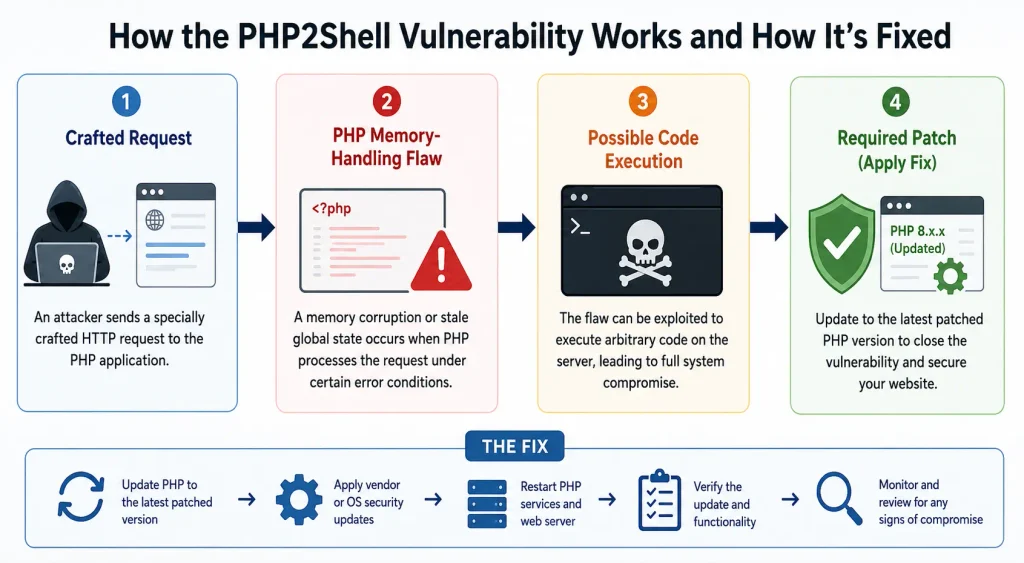
The PHP2Shell vulnerability October 2026 refers to two critical flaws in PHP’s runtime, the software that executes PHP code on a server. Researchers identified weaknesses involving memory handling when requests encounter certain error conditions.
The first flaw, CVE-2026-109618, involves memory corruption associated with out-of-memory errors. PHP may interrupt request processing while internal data remains partially initialised. Later cleanup operations can then interact with invalid data.
The second flaw, CVE-2026-109619, involves stale global state. Internal state can retain references to request memory after PHP releases it. A later request may encounter the invalid state before PHP resets it.
These issues matter because attackers may trigger vulnerable behaviour through crafted requests. Successful exploitation could lead to remote code execution (RCE) or access to sensitive process memory.
The PHP project released fixes for supported PHP branches on October 21, 2026. The incident demonstrates why organisations must monitor official advisories rather than wait for visible website problems.
How Does the PHP2Shell Vulnerability Put Your PHP Website at Risk?
The PHP2Shell vulnerability affects the PHP runtime rather than one particular website feature. Consequently, application-level protections alone may not eliminate the underlying risk.
PHP installations serving web requests can be exposed across several configurations, including PHP-FPM, Apache with mod_php, php-cgi, FrankenPHP, and LiteSpeed. The PHP team has highlighted a particularly serious risk for Apache mod_php because demonstrated exploitation can occur before application code runs.
Potential consequences depend on the server configuration, privileges, and successful exploitation. Attackers could gain a foothold, access sensitive information, modify website files, or attempt further movement within the environment.
For example, a compromised eCommerce website might expose customer information or allow unauthorised changes to application files. A business portal could face service disruption or unauthorised access to internal data.
These are potential outcomes, not proof that every vulnerable website has been compromised. However, the severity makes prompt remediation essential.
The incident also highlights a broader PHP security vulnerability lesson: a weakness in a widely used runtime can affect many applications simultaneously. Effective web application security therefore requires attention to application code, runtime versions, dependencies, and server configuration.
Is Your PHP Website Secure? Warning Signs You Shouldn’t Ignore
An outdated runtime is an important warning sign, but suspicious behaviour can also indicate compromise. A website may remain visually normal even when an attacker has gained access.
Review your environment for these indicators:
- Unexpected files: Unknown PHP scripts, modified application files, or unfamiliar files in upload directories.
- Unusual processes: Commands or background processes that your application does not normally start.
- Suspicious accounts: New administrator accounts, unfamiliar SSH keys, or unexpected changes to user permissions.
- Abnormal traffic: Unusual request patterns, unexplained traffic spikes, or repeated requests that trigger server errors.
- Unexpected outbound connections: Connections to unfamiliar destinations without a clear business purpose.
- Configuration changes: Modified PHP settings, scheduled tasks, access rules, or application credentials.
These indicators do not independently confirm an attack. Administrators should compare them against known deployment changes and normal application behaviour.
Start by checking every PHP installation, including staging environments, background workers, containers, and server tools. Do not assume that updating the main website automatically updates every PHP runtime on the server.
How to Fix the PHP2Shell Vulnerability and Secure Your Website
The priority is to install a fixed PHP release through your operating system, hosting provider, or approved package source.
As of October 23, 2026, the PHP project has released fixes in these versions:
| PHP branch | Fixed release |
|---|---|
| PHP 8.5 | 8.5.12 |
| PHP 8.4 | 8.4.27 |
| PHP 8.3 | 8.3.36 |
| PHP 8.2 | 8.2.35 |
These releases address the reported flaws. PHP 8.1 and older branches have reached end of life and do not receive regular updates from the PHP project. Some vendors provide backported fixes, so verify their specific package guidance before deciding whether an installation is patched.
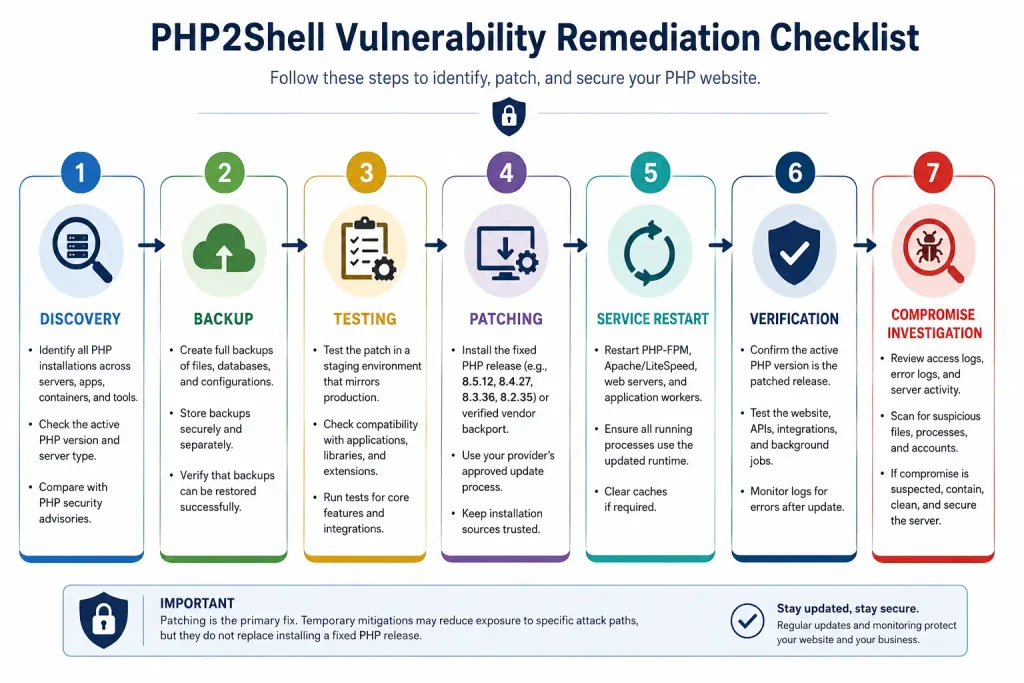
Follow these steps to reduce exposure:
- Identify affected installations: Check PHP versions across production servers, hosting accounts, containers, and bundled software.
- Back up critical data: Create verified backups and confirm that you can restore them.
- Test compatibility: Test the update in staging, particularly if your application relies on older libraries or custom extensions.
- Apply the patch: Install a fixed release using your provider’s supported update process.
- Restart relevant services: Ensure PHP workers and application processes use the updated runtime.
- Verify the result: Check the active PHP version and confirm that the website, integrations, and background jobs work correctly.
- Investigate possible compromise: Review logs and files if the server was exposed before patching.
A PHP security update is the primary remediation. Temporary configuration changes may reduce exposure to specific attack paths, but they do not replace the patch. Follow the official PHP security advisories and your platform vendor’s instructions for any temporary mitigation.
PHP Website Security Best Practices to Prevent Future Attacks
Responding to one incident is not enough. Consistent PHP website security best practices help reduce exposure to future vulnerabilities.
1. Keep PHP and dependencies supported
Plan a PHP version upgrade before your current branch reaches end of life. Update frameworks, plugins, extensions, and packages using trusted sources. Remove abandoned dependencies when practical.
2. Strengthen server configuration
Restrict file permissions and run application processes with only the access they need. Keep administrative interfaces private where possible, and separate application services to limit the impact of a compromise.
3. Protect credentials and sensitive data
Store secrets outside public directories and avoid committing credentials to source control. Use secure authentication, multi-factor authentication for administrative accounts, and encrypted connections.
4. Maintain reliable backups
Keep separate backups of website files, databases, and essential configuration. Protect backups from unauthorised changes and test restoration regularly.
5. Monitor activity continuously
Use centralised logs, alerts, and suitable security tools to detect unexpected behaviour. Effective PHP website protection depends on identifying suspicious activity early and responding quickly.
WordPress PHP security also requires attention to themes, plugins, administrator accounts, and hosting configuration. Updating WordPress alone does not guarantee that the underlying PHP runtime has received its security fixes.
Explore more: Dedicated programmers for your project
How to Conduct a PHP Website Security Audit
A structured PHP website security audit helps establish whether the environment remains exposed and whether other weaknesses need attention.
Begin with an inventory of PHP versions, server types, applications, extensions, and third-party packages. Compare this inventory with the relevant vendor advisories.
Next, review access controls, file permissions, authentication settings, database privileges, and exposed administrative endpoints. Check whether the application reveals errors or sensitive information to public visitors.
Run an appropriate website vulnerability assessment using reputable scanning tools and qualified security testing. Automated scans can identify known weaknesses, but they cannot prove that an application is completely secure.
Review server, application, authentication, and network logs for unusual activity. If you find evidence of compromise, preserve relevant logs and investigate before removing files or rebuilding services.
Record each finding, its severity, the affected asset, and the person responsible for remediation. This makes vulnerability management a repeatable process instead of a one-time activity.
Explore more: Benefits of PHP web development
Why Ongoing PHP Website Maintenance Matters for Security
Security needs change as software, dependencies, and attacker techniques evolve. Regular PHP website maintenance helps businesses keep systems supported, reduce technical debt, and respond to new disclosures.
Establish a routine for checking vendor advisories, applying updates, reviewing access permissions, and testing backups. Use security patch management procedures to prioritise critical vulnerabilities and document successful deployments.
Add website security monitoring to your normal operational process. Alerts should highlight unusual login attempts, unexpected file changes, suspicious processes, and other meaningful indicators.
If an incident occurs, follow a documented security incident response plan. Isolate affected systems when appropriate, preserve evidence, rotate exposed credentials, and restore services from trusted sources.
These steps also support website data protection by reducing the time attackers might have to access or alter sensitive information.
When Should You Hire PHP Security Experts?
Some updates are straightforward, but older systems can have complex dependencies or undocumented customisations. Professional support becomes valuable when teams cannot identify every PHP installation, test patches safely, or investigate possible compromise.
Consider working with specialists if your website handles sensitive customer data, supports important business operations, or runs unsupported software. Experts can review application code, server settings, dependencies, and deployment procedures.
If your team lacks internal security experience, hire expert PHP developers who understand secure coding, runtime configuration, and incident investigation.
A trusted partner can also support long-term PHP application security, rather than focusing only on one urgent patch. Businesses planning broader website development should build security reviews and maintenance into the project from the beginning.
When internal resources are limited, you may choose to hire a PHP development company for an independent assessment, remediation, and ongoing support. Confirm their experience with PHP security incidents and ask for a clear remediation plan.
Final Checklist to Keep Your PHP Website Secure
Use this checklist to turn the lessons from October’s disclosure into practical action:
- Identify every PHP installation and confirm its active version.
- Apply a fixed, supported PHP release or verified vendor backport.
- Plan migration away from unsupported PHP branches.
- Update frameworks, plugins, extensions, and dependencies.
- Review administrator accounts, credentials, and file permissions.
- Check logs for suspicious requests, processes, files, and connections.
- Investigate possible compromise before assuming a patch resolves every concern.
- Verify backups and test the recovery process.
- Establish routine updates, monitoring, and security reviews.
- Document responsibilities and escalation steps for future incidents.
The PHP2Shell vulnerability October 2026 shows why security cannot depend on a website appearing to work normally. Runtime flaws may exist beneath the application interface, beyond the reach of ordinary content checks.
Strong PHP website security combines timely patching, supported software, careful configuration, continuous monitoring, and a tested response plan. Acting promptly can reduce exposure and help businesses maintain more reliable online services.