


The release of iOS 27 is creating new opportunities for businesses to build more useful, intelligent mobile applications. iOS app development now involves more than delivering polished interfaces and reliable features. Developers can also explore on-device language models, smarter app actions, and deeper connections with Apple’s AI capabilities.
For businesses, iOS 27 app development offers ways to simplify everyday tasks, improve content discovery, and deliver more relevant experiences. However, success depends on choosing features that solve real user problems rather than adding AI for its own sake.
Apple’s latest developer tools provide practical ways to explore these opportunities. Teams must still consider device compatibility, data privacy, model limitations, and the cost of maintaining AI-powered features.
What iOS 27 Means for the Future of iOS App Development
Apple released iOS 27 in September 2026, bringing new capabilities across its software platforms. Its developer resources highlight updates to language models, AI tooling, and app integration.
For businesses, iOS 27 development means evaluating how these capabilities can improve existing products. A customer support app might summarise long conversations, while a productivity app could help users organise notes or extract important details.
These opportunities do not make conventional development less important. Performance, accessible interfaces, reliable data handling, and clear navigation remain essential.
The most useful strategy combines established engineering practices with carefully selected AI features. Teams should begin with a specific user problem, test a suitable solution, and measure whether it improves task completion or customer satisfaction.
Developers must also consider the range of devices and software versions their customers use. Not every feature works on every device, language, or regional configuration. A strong release plan therefore includes fallback experiences for unsupported environments.
How Apple Intelligence Is Transforming iOS App Development
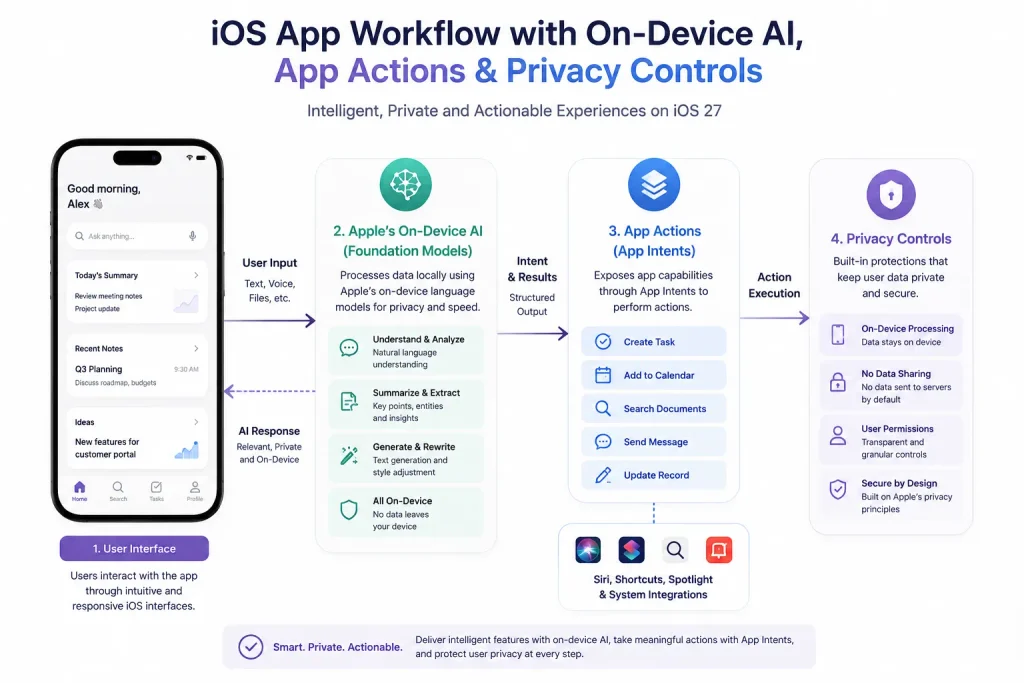
Apple Intelligence introduces AI capabilities across compatible Apple devices and applications. Its updated developer ecosystem gives teams more ways to incorporate language processing and app actions into their own products.
One important option is the Foundation Models framework. Apple provides a native Swift API for accessing its on-device language model. The framework also supports other language models that conform to its language-model protocol.
This creates several practical possibilities:
- Summarising user-provided notes or documents.
- Extracting key details from text.
- Categorising content based on its meaning.
- Rewriting text in a requested style.
- Supporting natural-language features within existing workflows.
For example, a project management app could summarise meeting notes and suggest action items. Users should still review those suggestions before assigning tasks or changing project records.
The approach to Apple Intelligence app development should match the task, data sensitivity, and expected response quality. A small text transformation may suit an on-device model, while complex or specialised requests may need a different model or service.
Apple’s App Intents framework also helps developers expose app actions to system experiences. Well-defined intents can make features easier to discover and invoke through supported system integrations.
Explore more: Optimising iOS app experiences for iPhone Duo
Key iOS 27 Development Changes Developers Should Understand
Several technical areas deserve attention when planning iOS 27 app development.
Native AI and model selection
The Foundation Models framework offers a way to use Apple’s on-device model. Teams can also assess alternative models where the framework and application requirements support them. On-device AI can reduce the need to send certain inputs to an external service. However, developers must still review permissions, storage, logging, and any other data transfers within the app.
Xcode and developer workflows
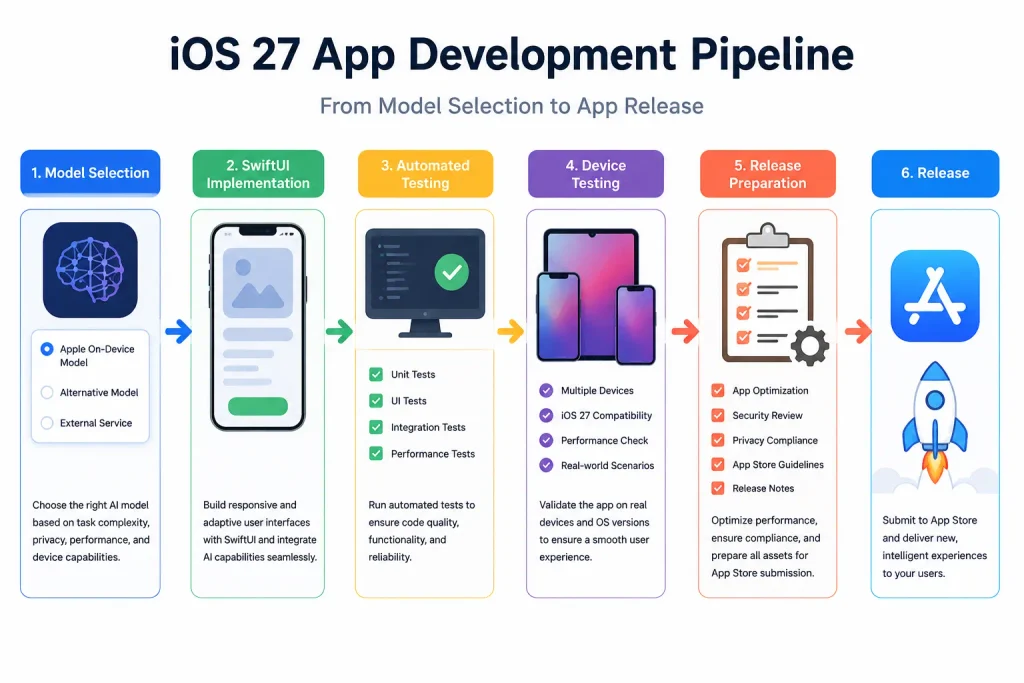
Apple’s Xcode 27 introduces expanded coding-intelligence capabilities, including support for skills that help AI coding agents work with app projects. These tools may assist with repetitive coding tasks, code exploration, or modernisation work. They do not replace engineering review, automated tests, security checks, or human judgement.
Teams should verify generated changes and maintain clear development standards.
Interfaces and app architecture
SwiftUI remains useful for building interfaces that respond to changing content and application state. Developers should organise views and business logic so new features do not create tightly connected, difficult-to-maintain code.
Apple’s Core AI technologies also support work involving models and on-device inference. Developers should evaluate the relevant APIs, device constraints, and deployment requirements before selecting an implementation.
AI-Powered iOS Apps: Features That Can Improve User Experiences
AI-powered iOS apps can make common tasks easier when features fit naturally into an existing workflow. The following examples illustrate realistic opportunities.
1. Smarter content and search
A knowledge-management app could help users find information using natural-language queries. Better Spotlight integration and suitable app indexing can also help users discover relevant content through Apple’s search experiences. Teams should decide which information users can search and how permissions affect those results.
2. More relevant recommendations
A shopping app could organise products based on selected preferences or recent activity. This can support a personalised user experience, provided users understand how the app uses their information. Recommendations should remain useful, explainable where appropriate, and easy to adjust.
3. Faster content creation
Writing and communication apps can use generative AI to draft summaries, restructure notes, or suggest replies. These features work best when users can review, edit, and approve the output.
4. Useful predictions and automation
Traditional machine learning can identify patterns in suitable datasets, such as forecasting demand or detecting unusual activity. AI language models can complement these systems, but they serve different purposes.
Businesses should select AI-powered features based on clear needs, measurable outcomes, and the consequences of incorrect results. Financial, medical, or other high-impact decisions require stronger safeguards than low-risk content suggestions.
Explore more: iPhone 18 Pro and iPhone Duo app planning
How iOS 27 Is Influencing iOS App Development Trends
Several iOS app development trends are gaining practical relevance as Apple expands its AI capabilities.
First, on-device AI gives developers another option for processing suitable tasks locally. This can reduce network dependence and limit some data transfers, although results depend on the model and implementation.
Second, apps are moving towards more natural interactions. Instead of navigating multiple screens, users may be able to initiate supported actions through system features or conversational interfaces.
For example, a travel app could expose a supported action for checking an itinerary. The app must still define the action, validate inputs, and confirm sensitive changes.
Third, developers are combining established application logic with AI assistance. AI can interpret a request or suggest an action, while conventional code handles permissions, business rules, and transaction validation.
Fourth, privacy and reliability are becoming central design considerations. A privacy-focused approach requires clear consent, minimal data collection, sensible retention policies, and appropriate security controls. Local processing alone does not guarantee complete privacy.
Finally, teams need to assess how AI features behave across devices and languages. Availability restrictions, model limits, and changing system behaviour can affect the experience. These considerations should shape development and testing plans from the start.
How to Prepare Your App for iOS 27 and Apple Intelligence
Businesses can prepare their products through a structured review rather than rebuilding everything at once.
1. Audit the existing app
Review the current architecture, dependencies, permissions, accessibility, and supported operating systems. Identify workflows where users spend too much time searching, reading, or repeating tasks.
2. Select one useful AI feature
Start with a contained use case, such as summarising notes or improving search. Define success measures before implementation, including task completion, response quality, error rates, and user satisfaction.
3. Evaluate models and privacy
Compare on-device processing with server-based alternatives. Consider response quality, latency, operating costs, offline behaviour, data sensitivity, and device compatibility. On-device AI can help keep suitable processing local, but teams must verify what data other parts of the application collect or transmit.
4. Test outputs and edge cases
Test unclear prompts, unsupported languages, incomplete information, and unexpected model responses. Provide a clear fallback when the feature cannot deliver a reliable result.
5. Review the full user journey
AI integration should feel like a natural part of the app. Give users control over important actions and explain when the app generates suggestions rather than verified facts. Apple updates its models and developer documentation over time. Teams should therefore retest prompts and behaviours when users adopt newer operating-system versions.
Choosing the Right iOS App Development Strategy
The right strategy depends on business goals, technical requirements, and the needs of the intended audience. Not every application benefits from a language model, and not every AI task belongs on the device.
Businesses should compare the expected user benefit against development effort, ongoing maintenance, infrastructure costs, and risk. A small pilot can reveal whether the feature solves a real problem before the team commits to wider implementation.
An experienced iOS app development company can help assess technical feasibility, select suitable frameworks, and plan testing. Teams can also hire iOS app developers with relevant Swift, architecture, testing, and AI integration experience.
When evaluating iOS app development services, ask how the team handles model evaluation, privacy reviews, unsupported devices, and post-launch monitoring. A reliable partner should explain limitations as clearly as the potential benefits.
A sound iOS application development plan also accounts for accessibility, performance, and ongoing support. AI features should strengthen the product’s core purpose rather than distract from it.
Final Thoughts
iOS 27 expands the options available to businesses building modern Apple applications. On-device language models, app actions, and improved development tools create practical ways to simplify tasks and improve content discovery.
However, results depend on implementation quality, clear use cases, privacy safeguards, and thorough testing. Businesses should prioritise useful improvements over novelty and measure whether each feature delivers genuine value.
A considered iOS app development strategy can help teams adopt these capabilities without compromising reliability or user trust. By testing a focused use case first, businesses can build a realistic roadmap for iOS 27 app development and adapt as Apple’s tools continue to evolve.