


A mobile learning application may offer engaging courses with videos and assessments, but what happens when learners’ activities do not synchronise with the primary learning management system? What if learners have to switch between multiple platforms to access their courses and track their progress?
These gaps can affect adoption, reporting and training outcomes. LMS integration for mobile learning apps connects the app with existing learning management software, allowing learners and administrators to work from consistent information. With the right LMS integration services and a well-planned integration, businesses can create a connected learning experience without replacing their entire training infrastructure.
What Is LMS Integration for Mobile Learning Apps?
A Learning Management System (LMS) is software that helps create, organise, deliver and manage educational and training programmes.
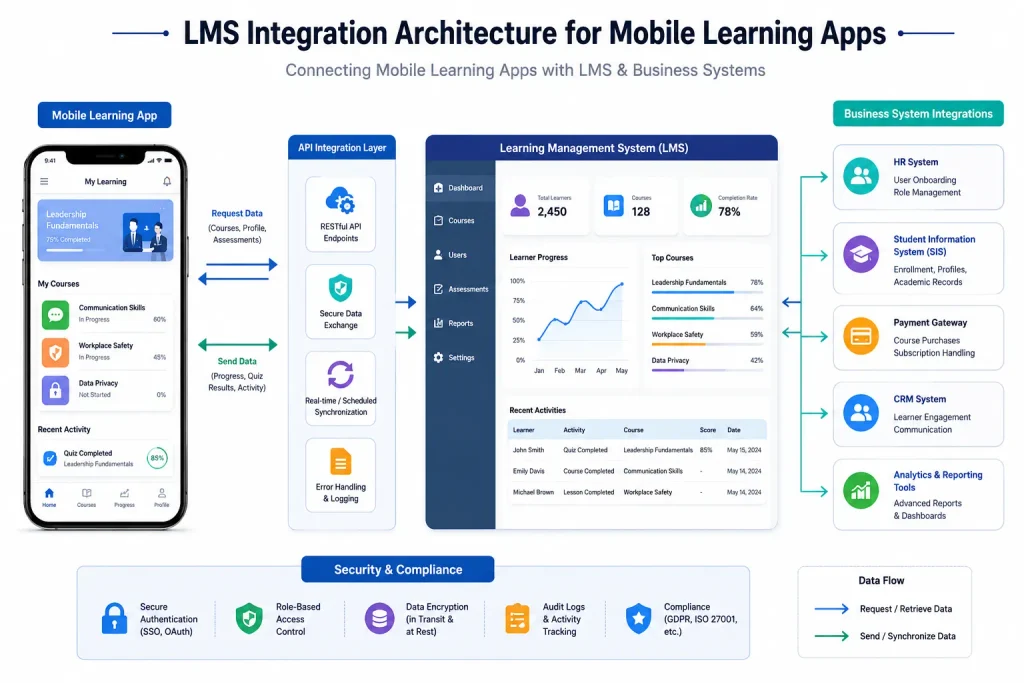
LMS integration connects an existing learning management system to a mobile application, allowing users to access courses and learning materials through their smartphones and tablets. The mobile app communicates with the LMS to retrieve course details, authenticate users, track learning activities and synchronise assessment results.
For example, a company using corporate training software such as Moodle to train its employees can connect the existing platform to a mobile app. Employees can then access assigned courses, complete lessons and monitor their progress from their phones or tablets.
The mobile app extends access to the existing LMS without replacing the platform or disrupting established course management processes. This approach allows businesses to improve mobile accessibility while retaining their existing training infrastructure.
Why Do Businesses Need LMS Mobile App Integration?
A mobile learning environment should work as part of the wider learning ecosystem, keeping information consistent across platforms. This is why businesses should consider integration early in their mobile learning app development process.
An unreliable integration can result in duplicate user records, outdated course information and incomplete progress tracking. These issues can affect the learner experience and make it difficult for managers to make informed training decisions.
A connected solution can help organisations:
- Make learning more accessible: Learners can access courses and complete training activities from their mobile devices.
- Maintain consistent progress tracking: Learning activities completed in the app are synchronised with the central LMS, keeping learner records up to date.
- Simplify learning administration: Teams can manage users and course information without maintaining duplicate records and course information without maintaining duplicates.
- Provide better insight: Managers can monitor course completion, assessment outcomes and learner engagement, assessment outcomes, and engagement.
- Integrate with the existing system: Businesses can utilise their existing learning infrastructure.
For organisations delivering staff training across different locations, this connection can make learning easier to manage and measure.
How Does LMS Integration Work with a Mobile App?
The integration process depends on the existing LMS, application architecture and types of data that need to be exchanged. However, most LMS integration projects follow a similar process. However, most LMS integration projects follow a similar process.
1. Connect Through APIs
An LMS API enables the mobile application to retrieve information from the learning platform and send relevant updates back to the system. Through LMS API integration, developers can retrieve course lists, learner profiles, assessment results and other authorised data.
For example, Moodle provides web services designed to support mobile applications and external systems. These services enable authenticated communication between the app and the platform.
2. Set Up User Authentication
The app needs to recognise learners and determine which resources they are authorised to access. This may involve identity verification, role-based access control and single sign-on (SSO). Custom LMS integration allows businesses to configure authentication workflows, user permissions and security controls according to their existing IT policies.
Users can sign in to the mobile application through their organisation’s identity provider, reducing the need for separate login credentials. The integration should also account for session timeouts, password changes and access permissions.
3. Synchronise Courses and Learning Activity
The app retrieves assigned courses, learning materials and assessment information from the LMS. Once a learner finishes a lesson or completes a quiz, the results are synchronised with the LMS and reflected in the app.
This enables progress synchronisation between the app and LMS. Depending on the integration architecture, updates can occur in real time or at scheduled intervals. Offline learning may require local storage and a reliable process for uploading activity when the device reconnects.
4. Connect Other Business Systems
Some organisations also need student information system integration to synchronise enrolment, learner profiles and academic records. A broader learning management system integration strategy may also connect payment gateways, CRM platforms, HR systems and reporting tools.
These third-party connections help the learning app fit into existing business operations rather than becoming another isolated platform.
Explore more: eLearning app development: a comprehensive guide
What Features Should a Mobile Learning App Include After Integration?
The right features depend on the audience and learning objectives. However, the following capabilities are useful in many business and education environments:
- Access to centrally organised courses: Learners can access their assigned courses and continue lessons from where they left off.
- Learner progress tracking: Both learners and administrators can monitor completed sections, assessment scores and incomplete sections.
- Push notifications: Learners can receive notifications about deadlines, new courses and upcoming assessments.
- Offline access: Learners can download selected course materials and access them without an internet connection. Their learning activities can then synchronise with the LMS when connectivity is restored.
- Analytics: Managers can analyse course completion rates and learner engagement.
- Secure access: Authentication and access controls help protect learner accounts and information.
- Assessment management: Quiz results and assignment scores are synchronised with the central LMS.
A good eLearning mobile app should make learning simpler, not overload users with every feature available in the desktop system.
Which Technical Standards Matter for LMS Integration?
Compatibility is an important consideration when connecting a mobile app to an existing e-learning environment. The right LMS integration solutions should support the required content formats and data exchange standards to ensure learning information moves smoothly between systems. Two standards play an important role in this process.
SCORM Compatibility
SCORM (Sharable Content Object Reference Model) is a set of technical standards that enables compatible eLearning content to communicate with a Learning Management System. It supports the tracking of course launches, completion status and assessment scores.
It is helpful when an organisation already has SCORM-enabled training materials that need to be made available using a mobile app. However, developers should ensure that SCORM capabilities are supported by the LMS, content package, and mobile delivery method used.
xAPI Integration
xAPI integration enables organisations to track learning activities in various settings. It goes beyond the normal course to capture other activities like simulations, exercises, and learning that may happen outside the LMS.
SCORM would be appropriate for delivery and tracking of courses. On the other hand, xAPI supports a wider range of learning activities where the business requires information on various learning experiences. It all depends on reporting requirements and current systems.
How to Plan a Successful LMS Integration Project
Before starting development, take a step back and understand what your business and learners actually need. Think about how the app should work with your existing LMS, what information it needs to share and how it will support your learning goals as your business grows.
Follow these six steps to plan your LMS integration for mobile learning apps effectively.
Step 1: Audit Your Existing LMS
Review your LMS capabilities, API documentation, authentication mechanisms and supported content formats. This helps identify technical requirements before development begins.
Step 2: Map the Learner Journey
Define how learners will log in, access courses, complete lessons and view their progress. Include learner progress tracking in this journey so users and administrators can see how learning activities are recorded across the app and LMS.
Step 3: Define the Integration Strategy
Decide which information needs to move between systems and how frequently it should update. Plan the LMS mobile app integration around course data, learner records, assessments and progress updates.
Step 4: Establish Security Controls
Implement appropriate encryption, access controls, secure authentication tokens and data retention policies to protect learner information throughout the integration process.
Step 5: Develop and Test the Integration
Establish the required connections and test for course access, submission of assessments, synchronisation of data, and error handling. Test that your app interacts with the LMS effectively on various devices.
Step 6: Monitor and Improve After Launch
Track integration performance, review learning analytics, resolve technical issues and update the app when the LMS changes. Regular maintenance helps keep the connection reliable and gives businesses useful insights into learner engagement and progress as requirements evolve.
For larger organisations, enterprise LMS integration can also involve HR platforms, identity providers and reporting systems. Account for these dependencies early to avoid unnecessary complexity later.
Explore more: How eLearning apps are transforming education in the UK
Important Considerations Before Choosing an Integration Approach
Not every organisation needs the same technical setup. A cloud-based LMS may offer ready-made APIs, while a self-hosted platform could require additional configuration. The app should also support the required course management workflows, content formats and reporting rules.
Before development, check three areas:
- Data security and privacy: Verify how learner data is stored, transferred and accessed. Be sure to set proper permissions, especially if the app manages employee or student data.
- Content compatibility: Test whether current content runs well on mobile devices and whether assessments, videos and other interactive components work as intended.
- Scalability: Assess whether the system can support new courses, audiences and integrations in the future without requiring major changes.
Businesses may want to link training courses in an LMS with HR data, staff roles and compliance needs. Therefore, mobile LMS development should be designed to allow these processes in the correct way from the beginning.
How Much Does LMS Integration Cost?
Integrating an LMS with a mobile application can cost between £2,000 and £15,000+, while more complex enterprise integrations can exceed £20,000.
As an indicative guide:
- Basic integration (£2,000 – £5,000): Covers essential LMS integration with mobile apps, including course access, learner accounts and basic progress updates.
- Moderate integration (£5,000 – £15,000): Includes custom API connections, SSO, assessment synchronisation and reporting.
- Advanced integration (£15,000 – £30,000+): Covers multiple platforms, offline learning, SCORM or xAPI support, complex workflows and enterprise-level security.
The main factors influencing the cost include:
- Current LMS platform and its API capabilities.
- Number of systems to be integrated.
- Authentication and access requirements.
- Offline capabilities and data synchronisation.
- Additional customisations and testing.
Ending Note
Integrating an LMS with a mobile app is important in order to achieve connected mobile learning. Course information, learner data, assessment results and progress reports can be synchronised across connected systems through this process, which makes it easier for the company to handle the training process and provide educational opportunities to learners regardless of their location.
If the learning needs evolve, you will need to be prepared to support other courses, more users, modified content, etc. Proper planning regarding scalability, security, and maintenance can simplify future updates and system management.
Choosing the right educational app development partner also matters. An experienced team can assess your existing LMS, identify integration requirements and build a solution that supports your learning objectives without adding unnecessary technical complexity.
Looking to connect your LMS with a mobile app? Get expert guidance to plan an integration that works for your business today and grows with your future learning needs.