


Property buyers increasingly expect more than photographs and written descriptions when exploring homes online. Virtual property tours give users a better understanding of a property’s layout, room sizes, and overall appearance before arranging an in-person visit. For businesses, virtual tours in property apps can improve property discovery and help potential buyers make more informed decisions.
However, adding a tour feature involves more than embedding a panoramic image. Businesses must consider capture technology, app performance, navigation, accessibility, hosting, and integration with existing property data. The right approach depends on the target audience, property types, and business objectives.
A well-planned solution can make property exploration more convenient while supporting stronger enquiries. This guide explains the key considerations businesses should evaluate before investing in this technology.
Why Businesses Should Consider Virtual Tours in Property Apps
Traditional property listings depend heavily on photographs, descriptions, and location details. These elements provide useful information, but they cannot always communicate how rooms connect or how a property feels.
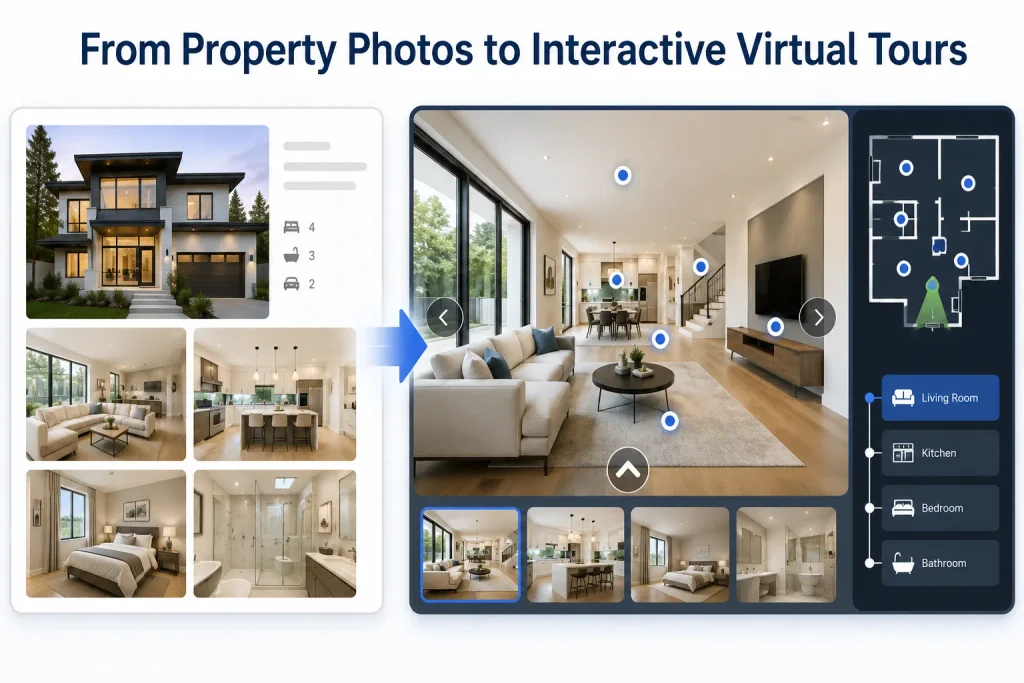
Virtual tours in property apps address this limitation by allowing users to explore spaces through their devices. Buyers can move between rooms, inspect different angles, and understand the property’s layout remotely.
Research supports a measured business case. A study examining 74,374 home sales found that virtual tours helped buyers assess property suitability earlier in the search process. Their value was particularly strong for larger and distinctive properties. However, the study found that their effect on final sales outcomes varied.
For businesses, the practical benefits include:
- Better property discovery: Buyers can assess more listings before arranging physical visits.
- More informed enquiries: Users can identify properties that match their expectations.
- Wider audience reach: Overseas buyers and distant investors can explore properties remotely.
- Stronger listing presentation: Agents can provide more context than static photographs alone.
- Improved engagement: Interactive content gives users another reason to spend time exploring listings.
These benefits depend on tour quality and relevance. A poorly captured tour can create confusion rather than confidence.
How Virtual Property Tours Work in a Real Estate App
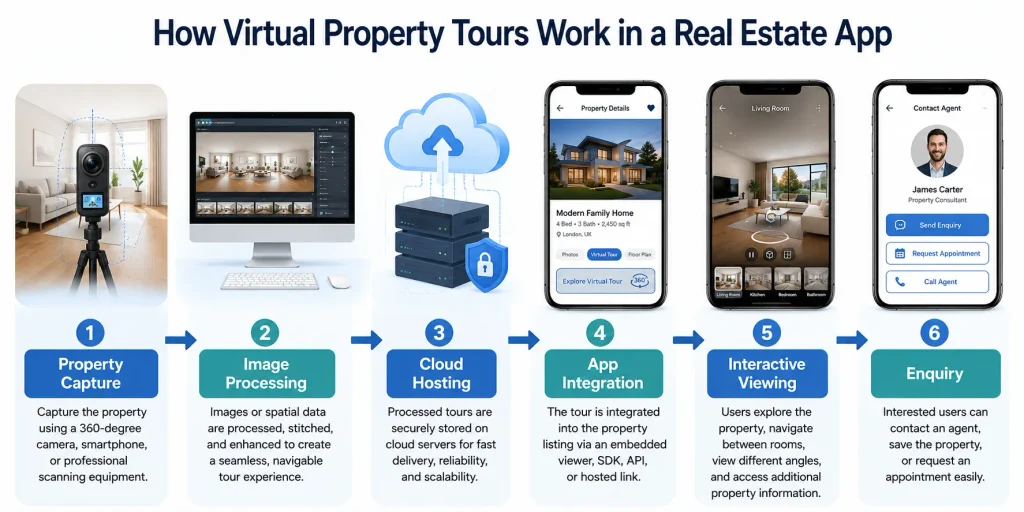
A typical tour begins with capturing the property using a 360-degree camera, a compatible smartphone, or professional scanning equipment. The captured images or spatial data then move through processing software.
The platform connects individual viewpoints and creates navigation between rooms. Expert developers can integrate the resulting experience into a listing through an embedded viewer, SDK, API, or hosted link.
When users open a listing, they can explore the available viewpoints through touch gestures. Depending on the technology, they may also inspect room measurements, navigate a floor plan, or view additional property information.
A virtual property tour app should connect this experience with the rest of the listing. Users should be able to return to property details, save a listing, contact an agent, or request an appointment without losing context.
The underlying architecture also matters. Businesses need a reliable way to upload, process, store, update, and deliver large media files.
Choosing the Right Virtual Tour Technology
Not every property business needs an advanced immersive experience. The right technology depends on the level of detail, production budget, and user expectations.
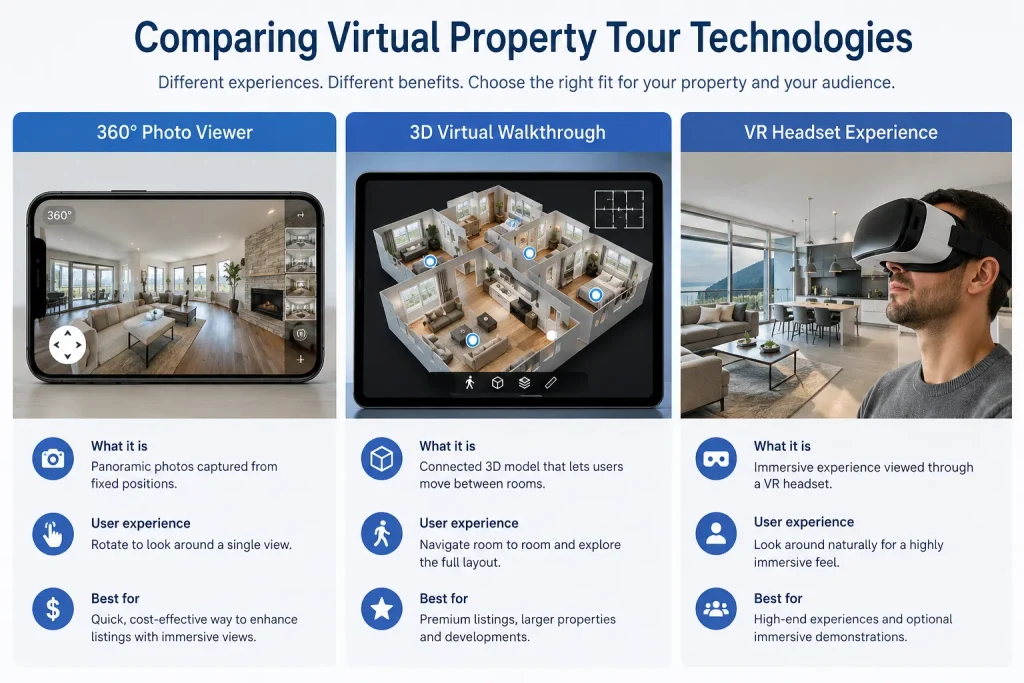
360-degree photography
360-degree photography captures a complete view from selected positions inside a property. Users can rotate the viewpoint and inspect their surroundings.
This option suits businesses that want an affordable way to improve existing listings. It offers a straightforward viewing experience without requiring a complete three-dimensional property model.
3D virtual walkthroughs
A 3D virtual walkthrough creates a more connected representation of the property. Users can move between rooms and understand spatial relationships more clearly.
This approach can support premium residential listings, commercial properties, and larger developments. It may also provide measurements or floor-plan views, depending on the capture platform.
Virtual reality experiences
Virtual reality (VR) can provide a more immersive viewing experience through compatible headsets. However, businesses should not make headset use mandatory.
Most property discovery still happens through phones, tablets, and computers. A practical product should offer an accessible standard viewer alongside optional immersive features.
Augmented reality
Augmented reality serves a different purpose. It can help users visualise furniture, finishes, or design changes within a real environment.
For example, an interior design application could let users preview furniture placement before making a purchase. Businesses should consider this as an additional feature rather than a replacement for property tours.
The broader use of virtual reality in real estate should reflect actual customer needs. Advanced technology adds value only when it helps users understand a property or make a decision.
Essential Features to Include in a Property App
The value of a tour depends on how well it connects with the wider application. Businesses should consider the following real estate app features when planning implementation.
1. Interactive navigation
Users should move between rooms through clear hotspots, arrows, or floor-plan controls. Avoid placing too many navigation points on one screen.
2. Floor-plan connectivity
Interactive floor plans help users understand where each room sits within the property. Connecting floor plans with tour viewpoints makes navigation more meaningful.
3. Property information overlays
Display relevant details such as room dimensions, flooring, fixtures, and renovation information. Keep descriptions concise so they do not obstruct the viewing area.
4. Listing and enquiry integration
Users should access pricing, availability, agent details, and enquiry forms directly from the tour. This connection supports a smoother journey from exploration to action.
5. Save and share options
Allow users to bookmark properties and share tours with family members or colleagues. These options help buyers compare listings and discuss decisions.
6. Analytics and engagement tracking
Track tour starts, completed views, popular rooms, and enquiry actions. These insights help businesses understand which listings attract attention.
A good property viewing app should also provide a reliable alternative when users have limited connectivity or older devices. Clear loading messages and fallback photographs can prevent a poor experience.
Explore more: How to build a real estate marketplace app
UX, Performance, and Accessibility Considerations
High-quality tours often contain large image files and detailed spatial information. Without careful optimisation, they can increase loading times and consume significant mobile data.
Businesses should use image compression, suitable media formats, content delivery networks, and progressive loading. Load the initial viewpoint first, then fetch additional scenes as users explore.
The interface should also work across different screen sizes. Touch controls need clear spacing, while labels and navigation elements must remain easy to understand.
Accessibility deserves equal attention. Provide text alternatives for important information, keyboard support where applicable, and controls that do not rely solely on gestures. The Web Content Accessibility Guidelines offer useful requirements for operable interfaces and accessible controls.
For immersive property viewing, businesses should also consider users who experience motion discomfort. Keep transitions predictable, avoid unnecessary movement, and offer direct navigation between viewpoints.
These improvements support a better real estate customer experience while making the application more dependable.
Integrating Virtual Tours into an Existing Property App
Businesses do not always need to rebuild their entire application to introduce tours. A phased approach can help teams validate demand before expanding the feature.
Start by reviewing the existing architecture, listing structure, media storage, and content management process. Identify whether the application can support external tour links, embedded viewers, or a dedicated integration.
A carefully planned virtual tour integration should connect each tour with the correct property record. It should also support updates when owners renovate rooms, change furnishings, or replace outdated media.
Teams should assess data ownership and vendor dependencies before choosing a provider. Confirm who controls uploaded media, how long tours remain available, and whether the business can export its content.
An experienced team providing real estate mobile app development can assess these technical requirements and recommend a suitable integration approach.
Businesses building a new product should plan the feature alongside search, listing management, user accounts, and enquiry workflows. This reduces the risk of creating a disconnected viewing tool.
The wider property search experience should remain consistent whether users open a tour, browse photographs, or compare listings.
Security, Scalability, and Long-Term Maintenance
Virtual tours introduce additional media, storage, and third-party service requirements. Businesses should evaluate these areas before launching the feature.
Consider the following:
- Media security: Protect private property content and restrict access where required.
- Privacy: Obtain permission before capturing personal belongings, occupants, or identifying details.
- Storage management: Define retention rules for outdated and inactive tours.
- Traffic management: Use scalable delivery infrastructure to handle viewing peaks.
- Vendor reliability: Review service availability, support, pricing changes, and export options.
A property management platform may also need role-based permissions. Agents, administrators, photographers, and property owners should receive access appropriate to their responsibilities.
Businesses should plan for real estate app scalability as listing volumes and media libraries grow. Reusable components, organised storage, and clear integration standards can reduce future maintenance.
This planning supports wider real estate digital transformation without creating unnecessary technical complexity.
Understanding the Cost of Virtual Tour Implementation
The cost depends on whether a business needs basic panoramic viewing, professional 3D capture, or a custom immersive system.
There are two separate cost areas: producing the tour content and developing the application functionality.
Professional capture costs vary by property size, location, equipment, and service provider. As a US market reference, Fash reports typical professional virtual tour pricing around $100–$360. Its guide places many professional 3D tours within a similar broad range, although larger properties can cost more.
Software hosting creates a recurring expense. Matterport, for example, lists a free option and paid plans based on active spaces. Its published annual Starter pricing begins at $12 per month, while Professional pricing begins at $58 per month. Plans and prices can change, so businesses should confirm current terms directly.
Custom virtual property tours inside an existing application introduce additional development costs. These may include:
- Viewer integration and interface design.
- API or SDK implementation.
- Cloud storage and media delivery.
- Content management and agent workflows.
- Analytics, testing, and ongoing maintenance.
A basic integration using an existing provider generally requires less work than a custom 3D viewing platform. Advanced features, high listing volumes, and bespoke capture workflows increase the investment.
Before budgeting, define the required tour type, expected monthly views, active listings, storage needs, and support requirements. This gives development teams a clearer basis for estimating the project.
Explore more: Cost to build a real estate app like Zillow
How to Choose the Right Development Approach
The best implementation starts with business requirements rather than technology selection.
A residential agency with a limited number of premium listings may benefit from a third-party tour provider. A large marketplace may need deeper integration, automated uploads, analytics, and centralised media management.
A specialist real estate app development company can help assess these requirements and compare available implementation options.
Businesses should evaluate potential partners on their experience with media-heavy applications, API integration, mobile performance, and ongoing support.
The right real estate app development solutions should also support future changes. For example, a business may begin with panoramic tours and later introduce floor-plan navigation or advanced spatial features.
Teams working on real estate mobile app development should test the complete journey, from uploading a tour to viewing it and submitting an enquiry.
Ultimately, the goal is not to add the most advanced technology. It is to make property exploration clearer, more useful, and easier to access.
Final Thoughts
Virtual tours in property apps can help businesses present properties more clearly and support buyers during early research. However, their value depends on more than visual quality.
Businesses must consider technology, user experience, integration, accessibility, performance, and long-term costs. A simple 360-degree viewer may suit one business, while another may need detailed 3D experiences.
The most effective solution matches the property’s needs and the audience’s expectations. When implemented thoughtfully, virtual property tours can strengthen property discovery and create a more useful digital viewing journey.